Schema markup for SaaS pages: what Google still shows
A type-by-type reference for founders and developers adding JSON-LD to a software product site, checked against Google Search Central documentation in October 2026.
By the CodeTrendy Editorial Team. Published , revised . 17 minute read, 14 sources.
The short answer
Which schema markup should a SaaS product page use?
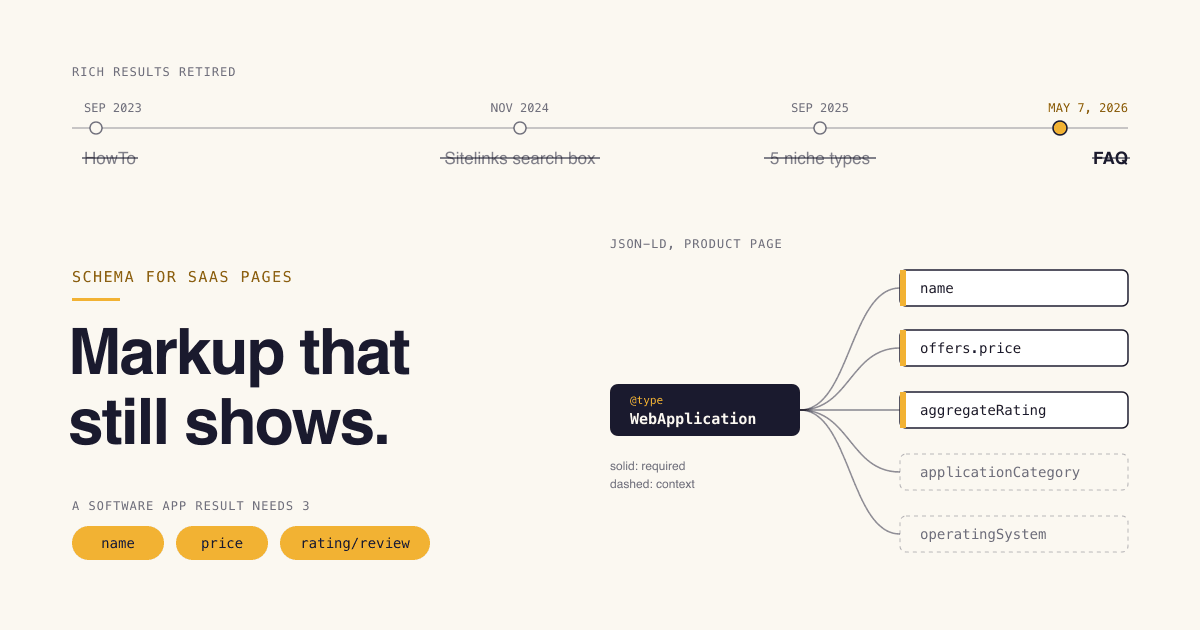
Use JSON-LD. Put Organization and WebSite on the home page, SoftwareApplication or WebApplication on the product page, BreadcrumbList on inner pages and BlogPosting on articles. A page is only eligible for Google's software app rich result when the markup has a name, a price and a rating or review that visitors can see on the page. FAQ and HowTo rich results are no longer shown, so that markup is context at best.
- Time needed
- About 2 hours
- Cost
- Free
- Skill level
- Can edit page HTML
- Format
- JSON-LD
What you will leave with
- Google lists Organization, Software app, Product, Review snippet, Breadcrumb, Article and Video in its structured data gallery. FAQ, HowTo and the sitelinks search box are not in it.[1]
- A software app rich result needs
name,offers.priceand eitheraggregateRatingorreview. Without a rating or review the item is not eligible.[2] - Ratings in markup must be visible on the page they mark up and must not be aggregated from other websites. Fake and undisclosed incentivized reviews are ruled out too.[6]
- A structured data manual action removes rich result eligibility. Google says it does not change how the page ranks.[5]
- Google states that structured data is not required for its generative AI search features and that no special schema.org markup exists for them.[14]
Which schema types matter for a SaaS website?
Nine types cover almost every SaaS site, and they fall into three groups: markup Google documents a visible result for, markup that is harmless context, and markup that only helps if you meet rules most product pages do not meet.
- Date from which Google says FAQ rich results no longer appear in Search[3]
- May 7, 2026
- Things a software app result requires: a name, a price, and a rating or review[2]
- 3
- Required properties for Organization markup. Google lists recommended ones only[7]
- 0
- Minimum number of ListItems in a BreadcrumbList[8]
- 2
Most schema advice is a list of types to paste in. That skips the only question that matters: what does each block do once Google has read it? Some markup is tied to a documented search feature with eligibility rules. Some describes your page accurately and changes nothing you can see. Some describes things that are not true or not on the page, and that is the kind that draws a manual action.
The table below is built from the Google Search Central page for each feature, opened on October 11, 2026. "Required" means required by Google for that feature, not by schema.org, which requires almost nothing.
Figure 1Schema types for a SaaS site: purpose, documented Google feature and required properties
| Type | What it is for | Google feature documented now? | Required by Google |
|---|---|---|---|
Organization | What it is forTells Google who runs the site and helps it disambiguate the company. Some properties can influence the logo and knowledge panel.[7] | Google feature documented now?Yes | Required by GoogleNone. Add the recommended properties that apply, such as name, url, logo, sameAs.[7] |
WebSite | What it is forStates your preferred site name for search results.[13] | Google feature documented now?Yes, as site names (not a gallery rich result) | Required by Googlename, url. Home page only.[13] |
SoftwareApplication / WebApplication | What it is forDescribes the app itself: price, category, rating.[2] | Google feature documented now?Yes, Software app | Required by Googlename, offers.price, and aggregateRating or review.[2] |
Product + Offer | What it is forProduct snippets: a text result that can show ratings, review information, price and availability. Google points pages that sell the product directly to merchant listing markup instead.[10] | Google feature documented now?Yes, Product snippet | Required by Googlename, plus one of review, aggregateRating or offers. An Offer needs price.[10] |
Review / AggregateRating | What it is forStars and rating counts under a result, nested in a supported type such as Software App or Product.[6] | Google feature documented now?Yes, Review snippet | Required by GoogleratingValue, plus ratingCount or reviewCount. A Review needs author and reviewRating.ratingValue.[6] |
BreadcrumbList | What it is forShows where the page sits in the site hierarchy.[8] | Google feature documented now?Yes, on desktop | Required by GoogleAt least two ListItem entries, each with position, name and item (the last may omit item).[8] |
Article / BlogPosting | What it is forHelps Google show better title text, images and dates for articles.[11] | Google feature documented now?Yes, Article | Required by GoogleNone. Recommended: headline, image, datePublished, dateModified, author.[11] |
VideoObject | What it is forMakes a demo or tutorial video eligible for video features such as key moments.[12] | Google feature documented now?Yes, Video | Required by Googlename, thumbnailUrl, uploadDate.[12] |
FAQPage | What it is forMarks up a list of questions and answers. | Google feature documented now?No. The rich result is no longer shown and its documentation was removed.[3] | Required by GoogleNot applicable |
Which rich results has Google removed or restricted?
FAQ, HowTo and the sitelinks search box no longer produce anything visible in Google Search, and several niche types were retired in 2025. If a tutorial tells you to add them for bigger search results, it is out of date.
Structured data features Google has retired, by date
Aug 8, 2023
FAQ limited, HowTo cut on mobile
Google announced that FAQ rich results would only be shown for well-known, authoritative government and health websites, and that HowTo results would only be shown to desktop users.[4]
Sep 14, 2023
HowTo removed on desktop too
An update to the same post says that, as of September 13, Google Search no longer shows How-to rich results on desktop, which makes the result type deprecated.[4]
Nov 29, 2024
Sitelinks search box documentation removed
Google removed the documentation because the feature is no longer available in search results.[3]
Sep 9, 2025
Five niche types removed
Documentation for course info, estimated salary, learning video, special announcement and vehicle listing was removed because those types are no longer shown.[3]
May 7, 2026
FAQ rich results end
A changelog entry dated May 8 adds a deprecation notice to the FAQ documentation and gives May 7, 2026 as the date from which the feature no longer appears in Google Search.[3]
Jun 15, 2026
FAQ documentation removed
Google removed the FAQ rich result page, stating the feature is no longer shown in Google Search results.[3]
None of this makes the markup invalid. FAQPage and HowTo are still schema.org types, and when Google restricted them in 2023 it said there was no need to proactively remove the markup and that the change should not be considered a ranking change.[4] We found no instruction to remove FAQ markup in the 2026 changelog entries either.
So treat it as context. If your page really has a visible FAQ, marking it up is accurate and costs nothing. Writing an FAQ you would not otherwise publish, just to get a bigger search result, no longer has a result to get.
How do you mark up a SaaS product page?
Use SoftwareApplication, or WebApplication for a browser-based product, with a name, an offer price and, only if you have them on the page, real user ratings.
Google supports MobileApplication and WebApplication alongside SoftwareApplication.[2] Its policies ask for the most specific applicable type, so a browser product is better described as a web application than as a generic product.[5]
The catch is the third required property. A software app item with no aggregateRating and no review is valid schema.org but is not eligible for the rich result.[2] For most early-stage SaaS sites that is the honest state of things: you have no on-site reviews, so you get no stars.
JSON-LD for a SaaS product page (WebApplication with Offer)
Paste into the product page, replace every value, and delete the whole aggregateRating block unless that rating is collected from your users and shown on this page.
<script type="application/ld+json">
{
  "@context": "https://schema.org",
  "@type": "WebApplication",
  "name": "Example App",
  "url": "https://example.com/",
  "description": "One sentence that also appears in the visible page copy.",
  "applicationCategory": "BusinessApplication",
  "operatingSystem": "Web browser",
  "offers": {
    "@type": "Offer",
    "price": 0,
    "priceCurrency": "USD"
  },
  "aggregateRating": {
    "@type": "AggregateRating",
    "ratingValue": "REPLACE_WITH_AVERAGE_SHOWN_ON_THIS_PAGE",
    "ratingCount": "REPLACE_WITH_COUNT_SHOWN_ON_THIS_PAGE"
  }
}
</script>
Notes on the fields
- offers.price If the app is available without payment, set it to
0. For a price above 0, Google recommends addingoffers.priceCurrency; without it, Google tries to work out the currency itself.[2] - applicationCategory Recommended, and it must be one of the values Google supports, for example
BusinessApplication,DeveloperApplication,DesignApplicationorFinanceApplication.[2] - operatingSystem Recommended, not required.[2] For a browser product, say what the user actually needs.
- aggregateRating Needs
ratingValueand at least one ofratingCountorreviewCount. IfbestRatingis left out, 5 is assumed.[6]
Which type and which properties, by situation
If You have a free plan
Set
offers.priceto0, as Google documents for apps available without payment.[2] A time-limited trial is not a free app, so in our view it should carry the real entry price.If You have several paid plans
Google documents a single
offers.price. A workable rule of thumb is to mark up the lowest plan a new customer can buy and make sure that exact price is visible on the page.If You collect reviews on your own site and show them on the page
Add
aggregateRatingwith the numbers shown on that page. This is the only case where the software app rich result is realistically in reach.If Your reviews live on third-party sites only
Leave ratings out of your markup. Google says not to aggregate reviews or ratings from other websites.[6]
What structured data belongs on the home page?
One Organization block and one WebSite block, on the home page only. Neither produces stars, but both feed things you can see: your logo, your knowledge panel details and the site name shown above your result.
Google recommends placing Organization markup on the home page or on a single page that describes the company, such as an about page. It does not need to be on every page.[7] There are no required properties, so the job is to fill in what is true and leave out the rest.
The WebSite block is how you tell Google your preferred site name. It must be on the home page, it needs name and url, and Google supports one site name per site, at domain or subdomain level but not for subdirectories.[13] Google describes site name generation as completely automated, so treat the markup as a stated preference, not a setting.
JSON-LD for the home page (Organization and WebSite)
Paste once into the home page. Remove any property you cannot fill with a real value.
<script type="application/ld+json">
{
  "@context": "https://schema.org",
  "@graph": [
    {
      "@type": "Organization",
      "@id": "https://example.com/#organization",
      "name": "Example App",
      "legalName": "Example App, Inc.",
      "url": "https://example.com/",
      "logo": "https://example.com/logo-512.png",
      "description": "What the company does, in one plain sentence.",
      "email": "[email protected]",
      "sameAs": [
        "https://www.linkedin.com/company/example-app",
        "https://github.com/example-app"
      ]
    },
    {
      "@type": "WebSite",
      "@id": "https://example.com/#website",
      "name": "Example App",
      "alternateName": "EA",
      "url": "https://example.com/",
      "publisher": { "@id": "https://example.com/#organization" }
    }
  ]
}
</script>
Details that are easy to get wrong
- The logo must be at least 112 x 112 px, at a crawlable and indexable URL, and should look right on a pure white background.[7]
sameAsis a recommended property for pages on other sites that carry more information about the organization, such as a social media or review site profile. List only pages that are really about your company.[7]
Which markup goes on which page?
Put each block on the page it describes and nowhere else. Google says structured data belongs on the page it describes unless a feature says otherwise.
Figure 2Where each structured data block belongs on a SaaS site
| Page | Markup | What to check |
|---|---|---|
| Home page | MarkupOrganization and WebSite | What to checkLogo URL loads, site name matches what the page calls the product.[13] |
| Product or pricing page | MarkupWebApplication with Offer | What to checkThe price in the markup is visible on the page. Ratings only if shown on the page.[2] |
| Every inner page | MarkupBreadcrumbList | What to checkAt least two items, with position starting at 1.[8] |
| Blog post, changelog entry, guide | MarkupBlogPosting or Article | What to checkHeadline, dates and author match the visible page. Google recommends images of at least 50K pixels in total area.[11] |
| Page with a demo or tutorial video | MarkupVideoObject | What to checkuploadDate in ISO 8601, ideally with a timezone, and a thumbnail URL unique to that video.[12] |
Should you use JSON-LD, Microdata or RDFa?
JSON-LD. Google accepts all three formats for rich results but recommends JSON-LD when your setup allows it, because it is the easiest to implement and maintain at scale.
JSON-LD
- Marked "recommended" in Google's list of supported formats.[9]
- A single script block in the head or body, separate from the visible HTML.[9]
- Google can read it when it is injected dynamically, for example by JavaScript or a CMS widget.[9]
- Trade-off: because it sits apart from the content, it can drift out of sync with what the page shows.
The call: Choose JSON-LD and generate it from the same data that renders the page, so the price and rating in the markup cannot differ from the ones a visitor sees. That removes the one real weakness of the format. This is our judgement, not a Google rule.
How do you implement and validate the markup?
Write the JSON-LD from your real page data, test it before and after deploying, then watch the Search Console reports. Valid markup is a precondition for a rich result, not a promise of one.
How to add and validate schema markup on a SaaS site
List your pages and pick one type each15 min
Use the page-by-page map above. One main item per page is enough. Skip any type you cannot fill with facts that are visible on that page.
Generate the JSON-LD from page data45 min
Start from the templates on this page. Feed in the same name, price and dates your page template renders, so the two stay in step when one changes.
Check the syntax with the Schema Markup Validator5 min
Paste the code into validator.schema.org. It checks the JSON and the schema.org vocabulary. It does not tell you anything about Google eligibility.
Run the Rich Results Test15 min
Google recommends it during development.[9] Test the code, then the live URL. Fix every critical issue. A software app item with no rating or review is missing a property Google requires, so expect the tool to flag it. That is the correct result if you have no reviews.
Monitor the rich result status reportsOngoing
After deployment, Google points you to the rich result status reports in Search Console.[9] Look again after every template or pricing change, because that is when markup and page drift apart.
Is schema markup worth the effort for a SaaS site?
The home page, breadcrumb and article markup is cheap and worth doing once. The star rating result is worth pursuing only if you already collect real reviews on your own site. Everything else is optional.
Figure 3Click-through rate lift reported in two Google case studies
Rotten TomatoesPages with structured data vs without
25%NestléRich result pages vs non-rich result pages
82%
Read that chart for direction, not size. The case studies are undated on the page, are not about software, and compare pages that earned a rich result with pages that did not. If your markup does not make you eligible for a visible result, there is no lift to capture.
For AI search features, Google is explicit: structured data is not required for generative AI search and there is no special schema.org markup to add, though it suggests continuing to use structured data as part of overall SEO.[14] We found no basis in Google's documentation for treating schema as a way to get cited in AI answers.
Figure 4Where to spend your schema effort
High effort or policy risk Cost to you, No visible result What Google documents
Skip
FAQ or HowTo content written only for markup, sitelinks search box markup, ratings copied from review sites.
High effort or policy risk Cost to you, Visible result documented What Google documents
Earn it first
Software app stars. They need a real on-site review system before the markup means anything.
Low effort and risk Cost to you, No visible result What Google documents
Harmless context
FAQPage on an FAQ you already publish, extra descriptive properties that match the page.
Low effort and risk Cost to you, Visible result documented What Google documents
Do onceStart here
Organization, WebSite, BreadcrumbList, BlogPosting, and VideoObject where a video exists.
Independent reviews are a separate matter from your own markup. A profile on a review site or a listing in a directory such as CodeTrendy has its own reviews section, and any ratings there belong to that page, not to your product page. You can browse existing listings to see how a third-party product page is structured, or read where to promote a startup for the wider picture.
A listing page on CodeTrendy carries its own JSON-LD, written by the site. It describes that page and adds nothing to your markup. If you want such a page, you can submit your product, and the pricing page shows what each plan includes.
Which schema mistakes can get a manual action?
Markup that says something the page does not show, or that is not true, is what draws a manual action. A missing required property is a smaller problem: the item is simply not eligible.
Mistakes that break Google's structured data policies
- Avoid: Marking up content visitors cannot see Google says not to mark up content that is not visible to readers of the page.[5] A rating that exists only in JSON-LD is the common case.
- Avoid: Self-serving or invented reviews The policies name fake reviews as an example of misleading content.[5] A guideline added in July 2026 also covers fake and undisclosed incentivized reviews.[3]
- Avoid: Importing ratings from review platforms Google says not to aggregate reviews or ratings from other websites, and that marked-up review content must be readily available to users on the marked-up page.[6]
- Avoid: Markup that does not match the page Structured data must be a true representation of the page content.[5] A price of 0 in markup next to a paid-only pricing table fails that test.
- Avoid: Site-wide product markup Put structured data on the page it describes.[5] The same
WebApplicationblock on every blog post describes none of them.
Pre-ship checklist for SaaS structured data
0 of 15 done
Home page
Product page
Other pages
Validation
5 quick answers
Common questions
Short answers to the follow-up questions readers ask most.
Not here? Ask usYou do not have to. FAQPage is still a valid schema.org type, and when Google first restricted the feature in 2023 it said there was no need to proactively remove the markup. If the page has a real, visible FAQ, the markup is accurate and harmless. If the FAQ only exists to hold markup, remove both, because the search result it was built for is no longer shown.
Sources
- [1]Structured data markup that Google Search supportsGoogle Search Central, 2026
- [2]Software app (SoftwareApplication) structured dataGoogle Search Central, 2026
- [3]Latest Google Search documentation updatesGoogle Search Central, 2026
- [4]Changes to HowTo and FAQ rich resultsGoogle Search Central Blog, 2023
- [5]General structured data guidelinesGoogle Search Central, 2026
- [6]Review snippet (Review, AggregateRating) structured dataGoogle Search Central, 2026
- [7]Organization structured dataGoogle Search Central, 2026
- [8]Breadcrumb (BreadcrumbList) structured dataGoogle Search Central, 2026
- [9]Introduction to structured data markup in Google SearchGoogle Search Central, 2025
- [10]Product snippet (Product, Review, Offer) structured dataGoogle Search Central, 2026
- [11]Article (Article, NewsArticle, BlogPosting) structured dataGoogle Search Central, 2026
- [12]Video (VideoObject, Clip, BroadcastEvent) structured dataGoogle Search Central, 2026
- [13]Site names in Google SearchGoogle Search Central, 2025
- [14]Google's guide to optimizing for generative AI features on Google SearchGoogle Search Central, 2026
How this guide was put together. Every eligibility rule, required property and date on this page was checked against the text of the Google Search Central page for that feature, or the Search Central documentation changelog, on October 11, 2026. The rating values in the product page template are placeholders on purpose and must be replaced or removed. The click-through figures are from case studies Google publishes and do not predict results for any other site. The decision rules, the effort matrix, the checklist and the advice on multiple pricing plans are editorial judgement. Google changes these features often, so re-check the linked pages before relying on a rule.