How developers discover and adopt new tools
A field guide for anyone marketing a developer tool to people who distrust marketing. It follows one path: discover, evaluate in 5 minutes, first success, tell a colleague.
By the CodeTrendy Editorial Team. Published , revised . 18 minute read, 14 sources.
The short answer
How do developers find and adopt new tools?
Developers mostly find tools while solving a problem: 82.7% turn first to online search and 69.9% ask an AI agent, and 69.5% use public GitHub projects for technology content[1]. They then judge the tool by its README, docs and quickstart. So the marketing that works is a product surface that gets a stranger to a working result in minutes, shown in the places they already use, under those places' rules.
- Time needed
- 5 minutes to audit, a day or two to fix
- Cost
- Free
- Best for
- Libraries, CLIs, APIs, SDKs, dev-facing SaaS
- Survey year
- 2026 (Stack Overflow)
What you will leave with
- Name the channels developers reported using in 2026, with the exact figures and the question each figure answers.
- Explain why documentation is the top learning resource (58.9%) and what that means for where you spend effort[1].
- Post on Hacker News, GitHub, Stack Overflow and Reddit without breaking the rules each one publishes.
- Rewrite your README around a quickstart that reaches a visible result, using the skeleton on this page.
- Run a 5-minute cold-start audit and find the exact step where a new user gives up.
- Avoid the trust killers: astroturfing, gated docs, demo walls and undisclosed self-promotion.
Where do developers actually look for new tools?
In search results, in an AI assistant, and in a repository they already know, in that order. Very few start by asking a public forum, which is why being findable matters more than being loud.
- use online search tools first when trying to find answers to a problem (n = 16,664)[1]
- 82.7%
- ask an AI agent first, in the same multi-select question[1]
- 69.9%
- learned to code in the past year using technical documentation, the top resource (n = 14,530)[1]
- 58.9%
- post in a public online forum as a first action[1]
- 8.0%
These figures come from the 2026 Stack Overflow Developer Survey: 30,903 valid responses from 169 countries, recorded from June 23 to August 5, 2026[3]. The survey was promoted through Stack Overflow's own site, blog and email list, so it describes people Stack Overflow can reach, not every developer[3]. Read the platform ranking below with that in mind. Stack Overflow says so itself when it introduces that ranking: "This might be biased because it's our survey"[1].
The pattern is still useful. A developer with a problem searches, asks an assistant, or goes straight to a maintained repository and searches inside it. 43.7% picked that last option, and the survey's examples for it are Wikipedia, IMDB and GitHub projects, so it is wider than code hosting[1]. Your tool is discovered when it is the thing those three routes land on.
Figure 1Community platforms used for technology content in the past year (2026)
GitHub (public projects)
69.5%Stack Overflow
68.6%YouTube
58.4%Reddit
53.8%Stack Exchange
37.8%LinkedIn
37.8%Discord
33.4%Medium
26.3%Hacker News
24%X
16.4%
Figure 2How respondents learned to code in the past year (2026)
Technical documentation
58.9%AI codegen tools or AI-enabled apps
52.6%Other online resources (search, forums)
51.7%Videos (not part of a course)
41.1%Stack Overflow or Stack Exchange
33.8%Online courses or certification
29.3%Blogs or podcasts
27.6%Books / physical media
26.5%
Why do docs and a quickstart beat ads for a developer tool?
Because developers read far more than they post, verify before they trust, and learn from documentation first. An ad can buy a visit; only the product surface can survive the evaluation that follows.
Community behaviour is mostly silent. In the 2026 survey, 78.0% of respondents said they read answers, posts or discussions, while 31.2% ask questions and 33.7% answer them (n = 15,917)[2]. Most of your future users will evaluate you without ever speaking to you. Whatever they find on the page has to do the talking.
The same survey asked what makes people trust information they find while searching. The top answer is structure, not polish or brand.
Figure 3What makes developers trust information they find (2026, top 3 choices)
Well-organized and logical format and content
59.1%Many upvotes, likes, shares or views
48%Referred by a human I trust directly
46.6%Many citations; origin can be tracked down
39.8%Can see user activity of the person posting
25.3%Heard of the source before
24.3%Creative and thought-provoking
10.6%
Documentation is also where projects most often let people down. In GitHub's 2017 Open Source Survey (5,500 randomly sampled respondents from over 3,800 repositories), incomplete or outdated documentation was observed by 93% of respondents[14]. That survey is old, but the gap it describes is visible in newer platform data: GitHub's Octoverse report for September 2024 to August 2025 says about 63% of public repositories include a README[10]. Roughly a third have none.
What path does a developer take from discovery to adoption?
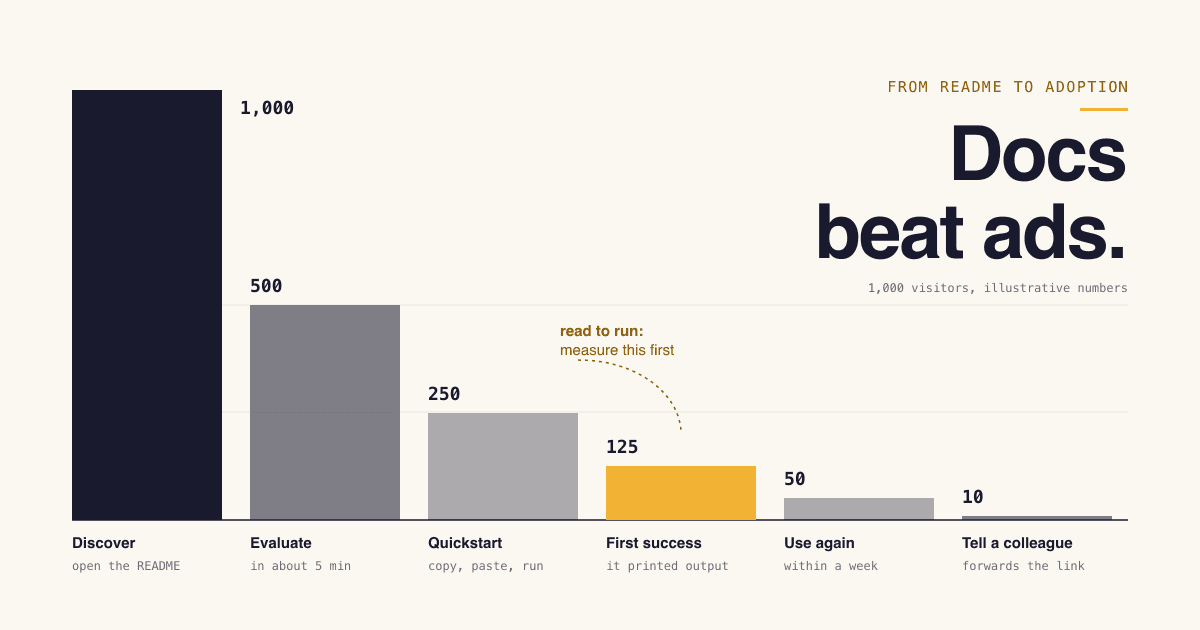
Four stages: discover, evaluate in about 5 minutes, reach a first success, tell a colleague. Each stage loses people. We expect the biggest loss between reading and running, so measure that step first.
Figure 4Evaluate-to-adopt path for 1,000 visitors (worked example)
- Open the README or docs home1,000
Discover: arrived from search, an AI answer, a repository or a link from a colleague.
50% continue
Understand what it does and keep reading500Evaluate: the first screen answers "what is this and is it for me".
50% continue
Start the quickstart250A visible install command with no signup in the way.
50% continue
Reach a first success125The command ran and printed what the docs said it would.
40% continue
Use it again within a week50It solved a real task, not only the demo.
20% continue
Tell a colleague10They forward the link or add it to a shared project.
The last stage is the one that compounds. Recall that 46.6% of survey respondents picked "referred to me by a human I trust directly" as a top-3 reason to trust information[2]. A colleague's recommendation is the discovery channel you cannot buy, and it only happens after a first success.
Use the calculator to see how much the middle of the path matters. It multiplies three numbers you can estimate from repository traffic, docs analytics and install or signup counts.
First successes per month
Estimate how many visitors reach a working result. Move the two rates to see which one is worth your next week of work.
- Visitors who start the quickstart
- 250
- First successes per month
- 125
A planning aid built on your own inputs. The defaults are placeholders, not benchmarks, and the result says nothing about retention or revenue.
Which channels can you use, and what are their rules?
GitHub, Stack Overflow, Reddit, Hacker News and your package registry all allow you to show your own work. Each one publishes a rule that separates taking part from spamming, and each rule is short enough to read before you post.
Figure 5Developer discovery channels: usage, what a tool maker can legitimately do, and the platform's own rule
| Channel | What developers do there | What you can legitimately do | The platform's own rule |
|---|---|---|---|
| GitHub | What developers do there69.5% used public GitHub projects for technology content in the past year[2]. | What you can legitimately doPublish the code or examples, write a README that answers the basics, keep issues answered. | The platform's own ruleThe Acceptable Use Policies prohibit "rank abuse, such as automated starring or following" and inauthentic interactions such as fake accounts[8]. |
| Stack Overflow | What developers do there68.6% used it; 33.8% learned to code with Stack Overflow or Stack Exchange in the past year[1]. | What you can legitimately doAnswer real questions well. Mention your tool only where it is the answer. | The platform's own ruleIf you mention your product or website "you must disclose your affiliation in your post". Some, "but not all", of your answers may be about your product[11]. |
| What developers do there53.8% used it for technology content[2]. | What you can legitimately doTake part in communities you have a real interest in; share your tool where that community's own rules allow it. | The platform's own ruleReddit Rules, Rule 2: "Participate authentically in communities where you have a personal interest, and do not spam"[12]. | |
| Hacker News (Show HN) | What developers do there24.0% used it[2]. | What you can legitimately doPost a Show HN once the tool can be tried, write the backstory yourself, stay in the thread to answer. | The platform's own ruleShow HN is for "something you've made that other people can play with". No landing pages or fundraisers. "Please don't ask friends to upvote or comment"[4]. |
| Package registry (npm as the example) | What developers do thereThe package page displays your README, so it is read at the moment of install. | What you can legitimately doShip a README that covers installing, configuring and using the package. | The platform's own ruleThe README.md "must be in the root-level directory of the package" and the page only updates when you publish a new version[9]. |
Drop any language that sounds like marketing or sales. On HN, that is an instant turnoff. Use factual, direct language. Personal stories and technical details are great.
Hacker News is the strictest of these, and the clearest. Its general guidelines say "Please don't use HN primarily for promotion. It's ok to post your own stuff part of the time, but the primary use of the site should be for curiosity", and "Don't solicit upvotes, comments, or submissions"[5]. The moderator tips, first posted in 2020 and edited in March 2026, add two details people miss: write the text by hand rather than with an LLM, and do not use your company or project name as your username[6].
Which channel first? (our judgement)
If The tool is open source or has a public example repository
Start with GitHub: README, licence, a tagged release. Every other channel will link there.
If It is installed from a registry
Fix the package README next, then publish a new version so the package page shows it[9].
If Anyone can try it in minutes with no signup
It is ready for a Show HN. Write the backstory and what is different about it[6].
If People already ask questions your tool answers
Answer them on Stack Overflow with your affiliation disclosed[11].
If It needs a sales call before anyone can run it
None of these channels fit yet. Build a self-serve path, even a sandbox or a limited local mode, first.
What should a README and quickstart contain?
One sentence on what it does, one copy-paste path to a visible result, and where to get help. Everything else can live one click away.
GitHub's documentation calls the README "often the first item a visitor will see when visiting your repository" and lists what it typically covers: what the project does, why it is useful, how users can get started, where they can get help, and who maintains and contributes to it[7]. npm's documentation asks for "directions for installing, configuring, and using the code in your package"[9]. The skeleton below follows both and puts the quickstart above everything optional.
README skeleton with a 5-minute quickstart
Paste into README.md, replace the bracketed parts, delete any section you cannot fill honestly.
# [Tool name]

[One sentence: what it does and who it is for. No adjectives.]

## Quickstart

Requires: [runtime and version, e.g. Node 20+]

    [one install command]
    [one command that produces a visible result]

Expected output:

    [paste the real output here]

If you see [the most common error], [the one-line fix].

## Why use it

- [Concrete thing it does that the obvious alternative does not]
- [Concrete limit: what it does NOT do]

## Next steps

- [Link: a real-world example, about 10 minutes]
- [Link: configuration reference]
- [Link: full docs]

## Help

- Questions: [where, e.g. Discussions or a forum]
- Bugs: [issue tracker link]
- Security reports: [contact]

## Status and licence

[Stable / beta / experimental]. Maintained by [who].
Licence: [SPDX id]. Pricing, if any: [link, no "contact us"].
Figure 6Where your README is shown and what each platform's documentation says about it
| GitHub repository | npm package page | |
|---|---|---|
| Where the file must live | GitHub repositoryGitHub looks in the .github directory, then the repository root, then docs, and shows the first one it finds[7]. | npm package pageREADME.md in the root-level directory of the package[9]. |
| What the docs say it covers | GitHub repositoryWhat the project does, why it is useful, how to get started, where to get help, who maintains it[7]. | npm package pageDirections for installing, configuring and using the code, plus anything else a user may find helpful[9]. |
| The catch | GitHub repositoryContent beyond 500 KiB is truncated when viewed on GitHub[7]. | npm package pageThe package page only updates when you publish a new version[9]. |
How do you audit your quickstart in 5 minutes?
Start from a clean environment, follow only what is written, and stop the clock at the first visible result. Wherever you had to use knowledge that is not on the page, that is the defect.
How to run a 5-minute cold-start audit of a developer tool
Open a clean environment1 min
A fresh container, VM or a new user account with none of your config, credentials or globally installed packages. Start a timer.
Arrive like a stranger30 sec
Search for the problem your tool solves, not its name, then open your repository or docs from the result. Note whether the first screen says what the tool does.
Copy and paste, nothing else2 min
Run the quickstart exactly as written. Do not fix typos, add flags or install missing prerequisites unless the page tells you to. Write down every point where you wanted to.
Compare the output30 sec
Check that what you see matches the expected output in the docs. If the docs show none, record that as a failure.
Stop the clock and log the gaps1 min
Record total minutes, each undocumented step and each wall (signup, key, email, sales contact). Fix the earliest gap first, then repeat with someone who has never seen the tool.
Product surface checklist
0 of 16 done
Discover
Evaluate in 5 minutes
First success
Tell a colleague
What mistakes make developers distrust a tool?
Anything that fakes independent enthusiasm, and anything that stops a developer from trying the tool on their own. The first gets you flagged; the second gets the tab closed.
Mistakes, and the rule or reason behind each
- Avoid: Asking friends, staff or users to upvote and comment Show HN says "Please don't ask friends to upvote or comment. That's not ok on HN"[4]. The moderator tips warn that readers spot booster comments and "consider it spamming"[6].
- Avoid: Buying or automating stars and followers GitHub names "rank abuse, such as automated starring or following" and activity incentivised by rewards such as credits, gifts or giveaways as prohibited[8].
- Avoid: Recommending your own tool without saying it is yours Stack Overflow requires you to disclose your affiliation whenever you mention your product, and warns that overt self-promotion gets voted down and flagged as spam[11].
- Avoid: Gated docs Documentation is the top learning resource in the 2026 survey[1]. Docs behind a login cannot be read by an evaluator, found by search, or forwarded to a colleague.
- Avoid: A "book a demo" wall before the first run It removes the 5-minute evaluation entirely. It also makes the tool ineligible for Show HN, which asks for something people can try, "ideally without barriers such as signups or emails"[4].
- Avoid: A quickstart that only works on your machine Undeclared prerequisites, stale version numbers and missing expected output. The audit above exists to catch exactly this.
There is also a quieter mistake: treating a channel as a megaphone when developers use it as a library. With 78.0% reading and far fewer posting[2], the durable asset in any community is a useful answer or a clear write-up that people keep finding, not the launch-day spike.
And know when not to bother. If your tool cannot be tried without a contract, the channels on this page will mostly return silence or irritation. Spend the time on a self-serve path instead.
Do AI assistants and directories change how tools get found?
AI assistants are now a first stop for most developers, but they answer from the same public surface: docs, READMEs and discussions. Directories are a small, optional extra, useful for being browsable by category and no substitute for the work above.
In the 2026 survey, 69.9% of respondents said they ask an AI agent first when trying to find answers to a problem, and 52.6% learned to code in the past year with AI codegen tools or AI-enabled apps[1]. GitHub reports that nearly 80% of new developers on its platform use Copilot within their first week, among more than 180 million developers building there[10]. The practical consequence is narrow: public, well-organised docs with real commands and real output serve a human evaluator and an assistant equally. Crawler access and machine-readable files are covered in our sibling guides, not here.
Search still leads at 82.7%[1], and in GitHub's 2017 survey 72% of respondents said they always seek out open source options when evaluating new tools[14]. Being present where someone compares options helps, as long as you are honest about what each placement is.
Where a directory listing fits, stated plainly
- A listing on CodeTrendy is a public profile page: name, tagline, description, screenshots, category and tags. You can also add the technologies you build with, which places the tool on the built with pages, and you can see what is already listed on browse.
- Submitting needs an account and takes a few minutes. The free route requires our badge on your site, is published automatically after at least a week once our check finds that badge, and carries an "Unverified" label. Paid listings go live right after payment; see pricing.
- CodeTrendy does not promise traffic, signups, rankings or citations by AI assistants. Treat a listing as one more accurate description of your tool on the public web, and do it after the README and quickstart are fixed, not instead.
- For a wider list of places and their rules, see where to promote your startup.
5 quick answers
Common questions
Short answers to the follow-up questions readers ask most.
Not here? Ask usThere is no published standard we could verify, so treat any number as a working target. This guide uses 5 minutes from opening the README to a visible result in a clean environment. That is our assumption about how long a stranger will give an unknown tool, not a measured figure. What matters more than the number is measuring it the same way each time and fixing the earliest step where a new user gets stuck.
Sources
- [1]2026 Developer Survey: CommunityStack Overflow, 2026
- [2]2026 Developer Survey: Community, full dataStack Overflow, 2026
- [3]2026 Developer Survey: MethodologyStack Overflow, 2026
- [4]Show HN GuidelinesHacker News (Y Combinator)
- [5]Hacker News GuidelinesHacker News (Y Combinator)
- [6]Tips about how to present your work (moderator comment linked from the Show HN guidelines)Hacker News (Y Combinator), 2020
- [7]About the repository README fileGitHub Docs
- [8]GitHub Acceptable Use PoliciesGitHub Docs
- [9]About package README filesnpm Docs
- [10]Octoverse: A new developer joins GitHub every second as AI leads TypeScript to #1The GitHub Blog, 2025
- [11]How to not be a spammerStack Overflow Help Center
- [12]Reddit RulesReddit
- [13]Federal Trade Commission Announces Final Rule Banning Fake Reviews and TestimonialsFederal Trade Commission, 2024
- [14]Open Source Survey 2017GitHub, 2017
How this guide was put together. Every figure and quoted rule on this page was checked against the text of the cited first-party page on 11 October 2026. The FTC press release was read from an archived copy of the ftc.gov page, because ftc.gov refused automated requests that day. Survey numbers are from the 2026 Stack Overflow Developer Survey (a self-selected sample recruited through Stack Overflow's own channels), GitHub's Octoverse report and GitHub's 2017 Open Source Survey; they describe those respondents and that platform, not all developers, and show what people report doing, not what causes adoption. The adoption path, the funnel and calculator numbers, the README skeleton, the 5-minute target, the checklist and the channel order are our editorial judgement, not measurements.