AI crawlers, robots.txt and llms.txt: a startup guide
A technical reference for founders who run their own site: every major AI crawler sorted by what it does with your pages, with the vendor documentation behind each row.
By the CodeTrendy Editorial Team. Published , revised . 18 minute read, 15 sources.
The short answer
Should a startup block AI crawlers in robots.txt?
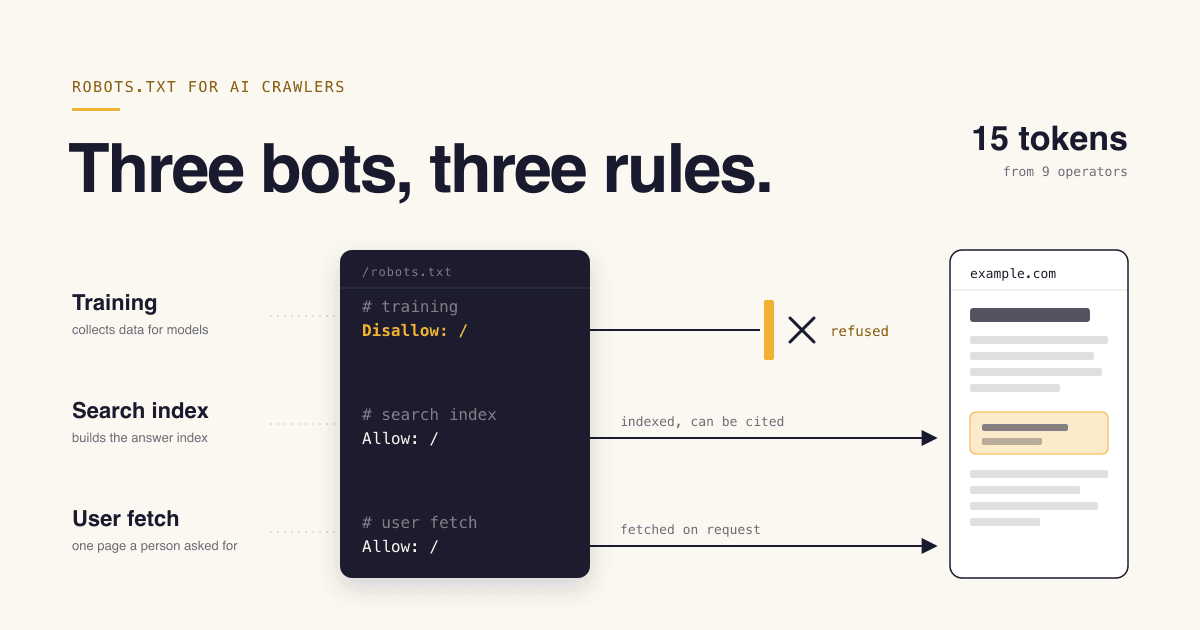
Not as one group. AI bots do three different jobs: collecting training data (GPTBot, ClaudeBot), building a search index (OAI-SearchBot, Claude-SearchBot, PerplexityBot) and fetching a page because a user asked (ChatGPT-User, Perplexity-User). Each has its own robots.txt token. Most startups should allow the search and user-fetch bots and decide separately about training. llms.txt is an optional community proposal, not an access control.
- Time needed
- About 1 hour
- Cost
- Free
- Skill level
- Edit a text file, read a log
- Best for
- Sites you host or deploy yourself
What you will leave with
- You can tell a training crawler from a search indexer from a user-triggered fetcher, and you know which token controls which.
- You have a robots.txt you can paste for three policies: allow everything, allow search but not training, or block all AI bots.
- You know which bots their own vendors say may ignore robots.txt: ChatGPT-User, Perplexity-User and meta-externalfetcher.[1][3][10]
- You know that blocking
Google-Extendeddoes not remove you from Google Search, and that it is not the control for AI Overviews.[4][5] - You can check your own access logs and confirm a request really came from the vendor it claims.
What kinds of AI bots visit a startup site?
Three kinds, and they are not interchangeable: crawlers that collect training data, crawlers that build a search index, and fetchers that load one page because a person asked an assistant about it.
- of desktop sites name gptbot in robots.txt (Web Almanac 2025)[14]
- 4.5%
- growth in GPTBot requests, May 2024 to May 2025, on Cloudflare[15]
- 305%
- for OpenAI search systems to adjust to a robots.txt change[1]
- ~24 hours
- of desktop sites serve a valid llms.txt (Web Almanac 2025)[14]
- 2.13%
The mistake that costs founders the most is a single rule for "AI bots". A blanket block written to keep your content out of model training also removes you from the search index that ChatGPT or Claude consult when a buyer asks for a tool like yours.
The vendors split these jobs on purpose and give each one its own token. OpenAI states that "each setting is independent of the others".[1] Perplexity says the same about its two agents.[3] The useful question is which of the three jobs you want done on your pages.
The vocabulary you need
- Training crawler
- Crawls on its own schedule to collect content that may be used to train models. Blocking it is an opt-out from future training, not a way to remove what was already collected. Examples:
GPTBot,ClaudeBot.[1][2] - Search indexer
- Crawls on its own schedule to build the index an assistant searches when it answers with links. Examples:
OAI-SearchBot,Claude-SearchBot,PerplexityBot.[1][2][3]
Which AI crawlers exist and what is each one for?
Fifteen tokens from nine operators cover almost everything a startup will see. The table lists each with the purpose its operator documents and what that operator says about robots.txt.
Figure 1AI crawlers and fetchers: robots.txt token, operator, documented purpose and robots.txt behaviour, per first-party docs checked in October 2026
| Token (operator) | Job | Purpose as the operator documents it | robots.txt, per the operator |
|---|---|---|---|
GPTBot (OpenAI) | JobTraining | Purpose as the operator documents itCrawls content that "may be used in training our generative AI foundation models".[1] | robots.txt, per the operatorDisallowing it is the documented signal that content should not be used for training. |
OAI-SearchBot (OpenAI) | JobSearch index | Purpose as the operator documents itSurfaces websites in search results in ChatGPT search features.[1] | robots.txt, per the operatorOpted-out sites are not shown in ChatGPT search answers, though they can still appear as navigational links. |
ChatGPT-User (OpenAI) | JobUser fetch | Purpose as the operator documents itCertain user actions in ChatGPT and Custom GPTs. Not used for automatic crawling.[1] | robots.txt, per the operator"Because these actions are initiated by a user, robots.txt rules may not apply." |
ClaudeBot (Anthropic) | JobTraining | Purpose as the operator documents itCollects web content that "could potentially contribute to their training".[2] | robots.txt, per the operatorHonoured. Blocking signals that future material should be excluded from training datasets. Supports Crawl-delay. |
Claude-SearchBot (Anthropic) | JobSearch index | Purpose as the operator documents itNavigates the web to improve search result quality for users.[2] | robots.txt, per the operatorHonoured. Blocking prevents indexing for search. |
Claude-User (Anthropic) | JobUser fetch | Purpose as the operator documents itAccesses sites when a person asks Claude a question.[2] | robots.txt, per the operatorHonoured. Blocking prevents retrieval in response to a user query. |
PerplexityBot (Perplexity) | JobSearch index | Purpose as the operator documents itSurfaces and links websites in Perplexity search results. Not used to crawl content for AI foundation models.[3] | robots.txt, per the operatorrobots.txt is the documented control. Perplexity recommends allowing it. |
Perplexity-User (Perplexity) | JobUser fetch | Purpose as the operator documents itSupports user actions within Perplexity. Not used for crawling or training.[3] | robots.txt, per the operator"Since a user requested the fetch, this fetcher generally ignores robots.txt rules." |
Google-Extended (Google) | JobUsage token | Purpose as the operator documents itControls whether content Google has crawled may be used to train future Gemini models and for grounding in Gemini Apps and Vertex AI.[4] | robots.txt, per the operatorrobots.txt only. It has no separate HTTP user agent string and does not affect inclusion or ranking in Google Search. |
Applebot-Extended (Apple) | JobUsage token | Purpose as the operator documents itOpts content out of training Apple generative models. It does not crawl webpages.[8] | robots.txt, per the operatorrobots.txt only. Pages can still appear in search results. |
CCBot (Common Crawl) | JobOpen dataset | Purpose as the operator documents itBuilds an open repository of web crawl data for public use and research.[9] | robots.txt, per the operatorA robots.txt disallow is the documented way to stop it. |
meta-externalagent (Meta) | JobTraining and indexing | Purpose as the operator documents itCrawls for "training foundation AI models or improving products by indexing content directly".[10] | robots.txt, per the operatorMeta documents a robots.txt disallow as the way to block it. |
meta-externalfetcher (Meta) | JobUser fetch | Purpose as the operator documents itFetches individual links at a user request.[10] | robots.txt, per the operatorMeta says this crawler "may bypass robots.txt rules" because its fetches are requested by a user. |
Amazonbot (Amazon) | JobTraining (possible) | Purpose as the operator documents itUsed to improve Amazon products and services; content "may be used to train Amazon AI models".[11] | robots.txt, per the operatorRespects the Robots Exclusion Protocol. Does not support Crawl-delay. |
Bytespider (ByteDance) | JobNot documented | Purpose as the operator documents itWe found no first-party documentation page for it. | robots.txt, per the operatorNo vendor statement found. Treat any claim about its behaviour as unverified. |
Amzn-SearchBot (search, not training) and Amzn-User (user fetch, "may not follow all robots.txt directives").[11] Sources[1][2][3][4][8][9][10][11]Figure 2Share of AI-only crawler requests on Cloudflare, May 2025
GPTBot5% in May 2024
30%ClaudeBot27% in May 2024
21%Meta-ExternalAgentNew entry
19%Amazonbot21% in May 2024
11%Bytespider42% in May 2024
7.2%
Do AI bots actually obey robots.txt?
The documented crawlers say they do, several user-triggered fetchers say they may not, and the standard itself says robots.txt is a request, not a lock.
RFC 9309, the 2022 standard for the Robots Exclusion Protocol, is blunt: "These rules are not a form of access authorization."[13] A robots.txt file is a published preference that well-behaved crawlers choose to follow. Anthropic says its bots honour it.[2] Amazon says automated crawling from its listed agents respects it.[11]
The user-triggered fetchers are the documented exception. OpenAI, Perplexity, Meta and Amazon each say their user-initiated agent may not follow robots.txt, on the reasoning that a person asked for that page.[1][3][10][11] Anthropic is the outlier: it documents Claude-User as blockable through robots.txt.[2] To keep a page from every fetcher, use a login. A firewall rule is real enforcement too, but Anthropic warns that IP blocking can stop its bot reading your robots.txt at all.[2]
How the standard resolves your rules
- A crawler looks for the group that matches its own token. Only "if no matching group exists" does it obey the wildcard group.[13]
- A robots.txt that returns a 4xx means crawlers may access anything. One that is unreachable (5xx) means they must assume a complete disallow.[13]
- Crawlers should not use a cached copy for more than 24 hours, so expect about a day before a change takes effect. OpenAI and Perplexity both quote roughly 24 hours.[13][1][3]
Crawl-delayis not in the standard. Anthropic supports it; Apple and Amazon say they do not.[2][8][11]
Which AI crawler policy should a startup choose?
If your public pages exist to sell the product, allow everything. If the pages are the product, allow search and user fetches and refuse training. Block everything only when being absent from AI answers costs you nothing.
Pick a policy from what your public pages are
If Marketing site, docs, changelog, pricing page
Allow all. You wrote these pages to be read and repeated. In our judgement a model learning that your product exists, and what it does, costs you nothing.
If Original writing, research, datasets or paid-quality content is what you sell
Allow search and user fetches, refuse training. Assistants can still find and link you; the training crawlers are asked to stay out.
If Mixed: public marketing plus a content library you want to protect
Split by path. Allow everything on the marketing paths and disallow the training tokens on the library path only.
If Logged-in app, customer data, staging
Authentication, not robots.txt. A disallow line is public and names the paths you want hidden.
If A bot is generating real hosting cost and you get nothing from it
Disallow that one token, wait a day, then check the logs. Escalate to a firewall rule only if it keeps coming.
If Legal or contractual reasons mean no AI reuse at all
Block all AI tokens and accept that the user-triggered fetchers which document a bypass may still load pages.
One honest caveat on "refuse training": no vendor document we opened says that allowing a training crawler makes a model more likely to mention you, and none says that blocking one makes it less likely. Vendors only document what the token controls. Choose on what you are comfortable with.
What should the robots.txt look like for each policy?
Three files cover it. Each one names tokens explicitly and repeats the private paths inside the named group, because a bot with its own group stops reading your wildcard group.
Policy 1: allow all AI bots
For marketing sites and docs. The named group repeats the private paths, because a bot with its own group ignores the wildcard group. Deleting the named group gives the same result.
# Search indexers, user-triggered fetchers, training crawlers and usage tokens
User-agent: OAI-SearchBot
User-agent: ChatGPT-User
User-agent: Claude-SearchBot
User-agent: Claude-User
User-agent: PerplexityBot
User-agent: Perplexity-User
User-agent: GPTBot
User-agent: ClaudeBot
User-agent: Google-Extended
User-agent: Applebot-Extended
User-agent: CCBot
Disallow: /admin/
Disallow: /api/

# Everyone else
User-agent: *
Disallow: /admin/
Disallow: /api/

Sitemap: https://example.com/sitemap.xml
Policy 2: allow search and user fetches, refuse training
For sites where the content itself is the asset. Replace /admin/ and /api/ with your own private paths, in both groups where they appear.
# Refuse training crawlers and training usage tokens
User-agent: GPTBot
User-agent: ClaudeBot
User-agent: Google-Extended
User-agent: Applebot-Extended
User-agent: CCBot
User-agent: meta-externalagent
User-agent: Amazonbot
User-agent: Bytespider
Disallow: /

# Allow search indexers and user-triggered fetchers
User-agent: OAI-SearchBot
User-agent: ChatGPT-User
User-agent: Claude-SearchBot
User-agent: Claude-User
User-agent: PerplexityBot
User-agent: Perplexity-User
Disallow: /admin/
Disallow: /api/

# Everyone else
User-agent: *
Disallow: /admin/
Disallow: /api/

Sitemap: https://example.com/sitemap.xml
Policy 3: block all AI bots
Googlebot and Bingbot are not listed, so classic search is unaffected.
User-agent: GPTBot
User-agent: OAI-SearchBot
User-agent: ChatGPT-User
User-agent: ClaudeBot
User-agent: Claude-SearchBot
User-agent: Claude-User
User-agent: PerplexityBot
User-agent: Perplexity-User
User-agent: Google-Extended
User-agent: Applebot-Extended
User-agent: CCBot
User-agent: meta-externalagent
User-agent: meta-externalfetcher
User-agent: Amazonbot
User-agent: Bytespider
Disallow: /

User-agent: *
Disallow: /admin/
Disallow: /api/

Sitemap: https://example.com/sitemap.xml
Three things in Policy 2 are judgement calls, so adjust them. Google-Extended also governs grounding in Gemini, not only training, so refusing it has a search-like cost inside Gemini products.[4] CCBot feeds an open dataset used for research as well as by AI developers.[9] And Amazonbot is described as improving Amazon products, with training as a possible use, so blocking it is broader than a pure training opt-out.[11]
Serve the file at the root of each host. Anthropic notes that an opt-out has to be repeated on every subdomain you want covered.[2]
What is llms.txt and do AI vendors actually use it?
llms.txt is a community proposal for a markdown file that helps an agent find the useful pages on a site. It is not a standard, it grants or denies nothing, no vendor crawler documentation we opened lists it as a signal, and Google says Google Search ignores it.
Jeremy Howard published the proposal on September 3, 2024 at llmstxt.org. The page was revised on August 10, 2026 and now describes itself as "v2 of the proposal".[12] It asks sites to publish a markdown file that offers "brief background information, guidance, and links to detailed markdown files". The only required element is an H1 with the site or project name; a blockquote summary and H2 sections of links are optional.
It does a different job from robots.txt. The proposal says robots.txt tells automated tools what access is acceptable, while llms.txt is "used on demand, when an agent needs information about a topic while assisting a user".[12] It is a map, written for inference time. It cannot block or allow a crawler.
Figure 3What first-party sources say about llms.txt (checked October 2026)
| Source | What it says | What it does not say |
|---|---|---|
| llmstxt.org (the proposal) | What it saysIt is a proposal. It notes that "the AI labs themselves publish llms.txt files for their own developer docs".[12] | What it does not sayIt does not claim that any vendor crawler fetches llms.txt automatically. |
| Google Search Central | What it saysCreating an llms.txt file "will neither harm nor help your site's visibility or rankings in Google Search, as Google Search ignores them."[6] | What it does not sayIt speaks for Google Search only, and adds that it is fine to keep the file for other services that use it. |
| OpenAI crawler docs | What it saysDocuments robots.txt tokens only. The docs site links to its own llms.txt.[1] | What it does not sayNothing about its crawlers reading your llms.txt. |
| Anthropic crawler help page | What it saysDocuments robots.txt and Crawl-delay only.[2] | What it does not sayNo mention of llms.txt. |
| Perplexity crawler docs | What it saysDocuments robots.txt and IP lists only.[3] | What it does not sayNo mention of llms.txt. |
Figure 4Share of desktop sites whose robots.txt names each AI token, 2025
gptbot
4.5%claudebot
3.6%ccbot
3.5%google-extended
3.4%perplexitybot
2.8%
A minimal llms.txt
Follows the structure in the proposal: H1, blockquote summary, H2 link lists, an Optional section.
# Example Product

> Example Product is a hosted API for resizing images. This file lists the pages that explain what it does and how to use it.

## Docs

- [Quickstart](https://example.com/docs/quickstart.md): Install the SDK and make a first request
- [API reference](https://example.com/docs/api.md): Every endpoint, parameter and error code
- [Pricing](https://example.com/pricing.md): Plans and limits

## Optional

- [Changelog](https://example.com/changelog.md): Release history
Our view: publish one if you have developer docs. It is a small job, the labs publish them for their own docs, and it gives a coding agent, or anyone pasting context into an assistant, a clean starting point. On a five-page marketing site it is harmless and low priority. Either way it is not a ranking lever. CodeTrendy publishes an llms.txt of its own as a markdown index of the site.
How do you check which AI bots are fetching your site?
Search your access logs for the user agent tokens, then confirm the source IP against the list the vendor publishes. The user agent alone proves nothing, because anyone can send it.
How to audit AI crawler traffic in your server logs
Find where raw requests are logged10 min
You need the log that records every request with its user agent and IP: the nginx or Apache access log, or the request log of your host or CDN. Browser-side analytics will not do.
Count requests per AI token5 min
Run the first command in the template below against at least seven days of logs. Substring matching on the token is enough: the full strings look like
compatible; GPTBot/1.4; +https://openai.com/gptbotorCCBot/2.0 (https://commoncrawl.org/faq/).[1][9] Two tokens will never appear:Google-Extendedhas no HTTP user agent string andApplebot-Extendeddoes not crawl.[4][8]Verify the IPs for the bots that matter15 min
OpenAI publishes one JSON list per agent (
openai.com/gptbot.json,searchbot.json,chatgpt-user.json), Anthropic publishesclaude.com/crawling/bots.json, and Perplexity publishesperplexitybot.jsonandperplexity-user.json.[1][2][3] For CCBot and Applebot, do a reverse DNS lookup and then a forward lookup on the result: genuine hosts sit undercrawl.commoncrawl.org(IPv4 only; Common Crawl also publishes its ranges as JSON) andapplebot.apple.com.[9][8]
Log commands (nginx or Apache combined format)
Adjust the log path. The second command shows what a bot requested; the third is the reverse-then-forward DNS check.
# 1. Requests per AI agent (counts log lines that contain each token)
for bot in gptbot oai-searchbot chatgpt-user claudebot claude-searchbot claude-user perplexitybot perplexity-user ccbot bytespider meta-externalagent meta-externalfetcher amazonbot applebot; do
  printf '%8d  %s\n' "$(grep -ic "$bot" /var/log/nginx/access.log)" "$bot"
done | sort -rn

# 2. Top 20 paths one bot requested
grep -i "gptbot" /var/log/nginx/access.log | awk '{print $7}' | sort | uniq -c | sort -rn | head -20

# 3. Source IPs for one bot, then verify one of them
grep -i "ccbot" /var/log/nginx/access.log | awk '{print $1}' | sort | uniq -c | sort -rn | head
host 203.0.113.10        # should return a vendor hostname
host the-hostname-it-returned # should return the same IPWhat mistakes do founders make with AI crawlers?
Nearly all of them come from treating the bots as one group, or from expecting robots.txt or llms.txt to do something they were never designed to do.
- Avoid: Blocking by copy-pasted list Check any "block AI bots" snippet for
OAI-SearchBotandPerplexityBotbefore you paste it. Disallowing them removes you from the search answers you were hoping to appear in.[1][3] - Avoid: Blocking Googlebot to avoid AI Overviews There is no robots.txt token for AI Overviews, and blocking
Googlebotremoves you from Google Search itself. Use the Search generative AI control in Search Console, or snippet limits such asnosnippetandmax-snippetif you want finer control.[7][5] - Avoid: Hiding private paths with Disallow robots.txt is public and "not a form of access authorization".[13] Listing
/internal-pricing/there advertises it. - Avoid: Forgetting that Applebot can inherit Googlebot rules If your robots.txt mentions Googlebot but not Applebot, Apple says Applebot follows the Googlebot instructions.[8]
When is none of this worth your time? If your site is a week old with a handful of pages, a default robots.txt with a sitemap line is enough: with no AI rules, every documented bot is already allowed. Come back to this when the logs show real volume, or when you publish something you would mind seeing reused.
Being crawlable is only the first condition for being mentioned; what an assistant says depends on what the open web says about you. For places where a product can be described publicly, see where to promote a startup; a profile on CodeTrendy is one such page, and it promises no traffic, ranking or AI citation (plans are on pricing).
AI crawler audit for one site
0 of 11 done
Decide
Publish
Verify
5 quick answers
Common questions
Short answers to the follow-up questions readers ask most.
Not here? Ask usNo. OpenAI documents GPTBot as the crawler for content that may be used in model training. Appearing in ChatGPT search answers is governed by a different token, OAI-SearchBot, and OpenAI says each setting is independent. Blocking GPTBot alone leaves search untouched. It also does not remove anything a model already learned before you added the rule.
Sources
- [1]Overview of OpenAI crawlersOpenAI
- [2]Does Anthropic crawl data from the web, and how can site owners block the crawler?Anthropic, 2026
- [3]Perplexity crawlersPerplexity
- [4]Google's common crawlersGoogle Search Central, 2026
- [5]AI features and your websiteGoogle Search Central, 2025
- [6]Google's guide to optimizing for generative AI features on Google SearchGoogle Search Central, 2026
- [7]Search generative AI controlGoogle Search Console Help, 2026
- [8]About ApplebotApple Support
- [9]CCBotCommon Crawl
- [10]Meta web crawlersMeta for Developers
- [11]AmazonbotAmazon Developer
- [12]The /llms.txt file, v2llmstxt.org (Jeremy Howard), 2026
- [13]RFC 9309: Robots Exclusion ProtocolIETF / RFC Editor, 2022
- [14]Web Almanac 2025, chapter 5: SEOHTTP Archive, 2026
- [15]From Googlebot to GPTBot: who's crawling your site in 2025Cloudflare, 2025
How this guide was put together. Every user agent token, purpose, quotation and robots.txt statement in this guide was checked against the text of the operator's own documentation page on 11 October 2026; where a page was silent (Bytespider, JavaScript rendering outside Apple, Anthropic full user agent strings) we say so instead of filling the gap. The robots.txt templates follow the group-matching rules of RFC 9309, but test your own file before relying on it. Adoption and traffic figures come from the HTTP Archive Web Almanac 2025 and a 2025 Cloudflare analysis of its own network, so they describe those samples, not your site. The policy recommendations, the decision rules and the checklist are editorial judgement, and vendor documentation changes often, so recheck the linked pages before relying on a specific row.