How do you publish an MCP server to the official registry?
The official MCP Registry lists a server once you prove you control its name and, for most package types, the package names that server back.
In practice: publish the code first (npm, PyPI, NuGet, crates.io, a container image or a release file) or put the server at a public HTTPS address. Then run mcp-publisher init, mcp-publisher login <method> and mcp-publisher publish.
The MCP Registry is the official central metadata repository for publicly accessible Model Context Protocol servers. It stores where a server is and how to start it, not the code. It is still in preview, so its docs warn that breaking changes or data resets may occur before general availability.
How big is the MCP Registry now?
We pulled every server from the public API on 31 October 2026, using the version=latest filter. The default listing leaves out entries marked deleted, so these counts do too.
53,479 server names listed
58.6% use an io.github.* namespace (31,348 names)
44.1% had their latest version published in October 2026 (23,609 names)
Which namespace should you choose?
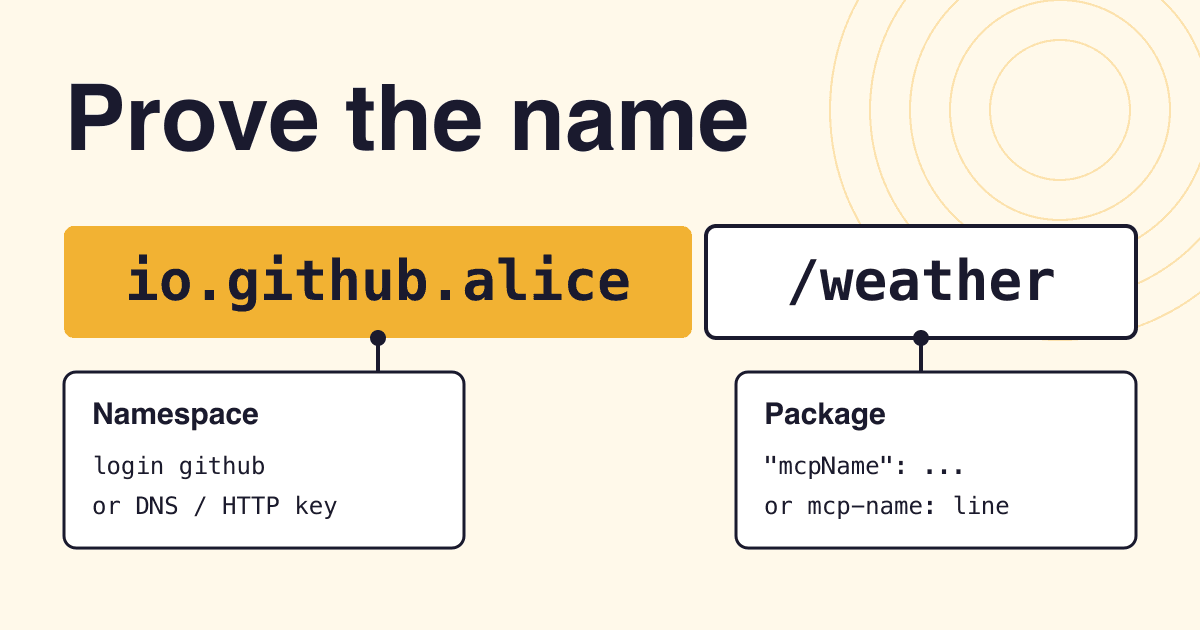
Your login method decides the first half of the name, and the authentication guide offers two families: GitHub-based and domain-based. Choose a domain name if the server is part of a product you own a domain for. Choose GitHub if it is a personal or open source project. That is our advice, not a registry rule.
| Method | Name looks like | Your proof | Watch out for |
|---|---|---|---|
| GitHub | io.github.alice/weather | A device-code login with mcp-publisher login github, or github-oidc in CI | With login github, the source code accepts organization Owners only. github-oidc grants the repository owner's namespace |
| DNS | com.example/weather or com.example.api/weather | A TXT record holding your public key, then a login with the private key | The source code covers subdomains too, but the record can take minutes to propagate |
| HTTP | com.example/weather | Your public key in a file at /.well-known/mcp-registry-auth, then a login with the private key | The source code covers that exact domain only |
Domain names are written backwards: example.com becomes com.example. The two domain methods use a key pair, so treat key.pem like a password and keep it out of your repository. Both refuse github.io domains, which go through GitHub login instead. The CLI reference lists no rename command, so choose a name you can keep.
What proof does each package type need?
The namespace login proves the name is yours. The package check proves the package agrees, so a stranger cannot point a listing at your code. The exception is MCPB, where the check is lighter. Each page below shows what the registry reads.
npm
An
mcpNamefield inpackage.json, equal to the server name.PyPI
mcp-name: your/namein the README. It may sit in an HTML comment.NuGet
The same
mcp-name:line in the README. A comment works here too.Cargo
The
mcp-name:line in visible README text. crates.io strips comments, so a hidden line fails.OCI image
A label
io.modelcontextprotocol.server.name, set in the Dockerfile withLABEL.MCPB file
A GitHub or GitLab release URL containing "mcp", plus a
fileSha256. Clients check that hash; the registry does not.Remote URL
No marker. The validator wants HTTPS, not localhost, and the URL must be free: no other server may hold it.
Only public registries count: the requirements page names npmjs.org, pypi.org, nuget.org, crates.io and a short list of container hosts. A private server cannot be listed. The docs point those teams to a private registry of their own.
What goes in server.json?
This is a complete file for a package server. The schema requires only name, description and version, and the rest tells a client how to start your server.
{
  "$schema": "https://static.modelcontextprotocol.io/schemas/2025-12-11/server.schema.json",
  "name": "io.github.alice/weather",
  "title": "Weather",
  "description": "Forecasts and severe weather alerts for any US city.",
  "repository": {
    "url": "https://github.com/alice/mcp-weather",
    "source": "github"
  },
  "version": "1.0.1",
  "packages": [
    {
      "registryType": "npm",
      "identifier": "@alice/mcp-weather",
      "version": "1.0.1",
      "transport": { "type": "stdio" }
    }
  ]
}packages for remotes; the two can coexist.name- 3 to 200 characters, one slash. For npm it must equal
mcpName. description- 100 characters at most. The median listing uses 90, and 31.2% use 95 or more, so write it to fit.
version- Unique for every publish. Align it with the package version.
latestand ranges such as^1.2.3are refused. repository- Optional, yet 66.9% of listings fill it in, and 62.0% add a
websiteUrl.
What are the publish steps, in order?
The order matters because the registry reads the live package. The steps follow the official quickstart for an npm server, with the name proved through GitHub, plus validate from the CLI reference.
- Add the marker. Put
"mcpName": "io.github.alice/weather"inpackage.json. - Publish the package. Run
npm publish --access public. The marker must be in the version you ship. - Install the CLI. Run
brew install mcp-publisher, or use the prebuilt binary from the quickstart. - Create the file. Run
mcp-publisher init, then replace every placeholder it leaves. The init source writes ones such asio.github.<your-username>/...in the name,[describe what your server does]and@your-org/your-package. Delete the sampleYOUR_API_KEYvariable if your server needs none. - Check it. Run
mcp-publisher validate. It lists every schema and format problem at once and publishes nothing. It does not check the marker, your login or duplicates. - Log in. Run
mcp-publisher login githuband enter the code it prints. - Publish. Run
mcp-publisher publish. - Confirm. Search the API for your name, as below.
curl "https://registry.modelcontextprotocol.io/v0.1/servers?search=io.github.alice/weather"How do you publish from CI?
The GitHub Actions guide recommends OIDC, so no registry token sits in your secrets. This is the same idea as npm trusted publishing. Keep the job's tag trigger and the npm publish step, then end with:
permissions:
  id-token: write   # required for OIDC
  contents: read

steps:
  # checkout, build, npm publish, install mcp-publisher
  - run: ./mcp-publisher login github-oidc
  - run: ./mcp-publisher publish
Why was my publish rejected?
The first three messages come from the quickstart troubleshooting table. The last three come from the source code: database, validator and service.
| Message | What to do |
|---|---|
Registry validation failed for package | The marker is missing or does not match. Fix it, ship a new package version, and point server.json at that version. |
You do not have permission to publish this server | Your login does not match the namespace. With GitHub login, the name must start with io.github. plus your username or organization. |
Invalid or expired Registry JWT token | Log in again with your method, for example mcp-publisher login github. |
cannot publish duplicate version | That version is taken for good. Raise version and publish again. |
version must be a specific version, not a range | Use an exact string such as 1.0.1. |
remote URL ... is already used by server ... | Another server name holds that URL. Publish under the name that holds it, or use your own URL. |
What does a listing not mean?
Listed means security reviewed.
The registry delegates security scanning to package registries and aggregators, and its moderation policy tells consumers to assume minimal-to-no moderation.
I can fix a typo in the live entry.
Published metadata is immutable, as on npm. Publish a new version instead.
Every MCP client now shows my server.
The registry is not meant to be read directly by host apps. Aggregators copy it, and each one decides what to show.
Will a registry listing bring you users?
Not by itself. The list is crowded, and ten namespaces hold 15.7% of all names. The API publishes no install or usage counts, so we cannot measure what a listing is worth.
203 servers mention "weather" only in their description, so a weather search misses them. Another 118 have it in the name.
That gap comes from one line in the API specification: search matches the server name as a substring and reads nothing else. Results come back sorted by name, not by quality. So put the word people search for in the name: /weather beats /wx-tool. It is the same logic as choosing a package name.
Real reach comes from what sits downstream. Aggregators copy the data on a regular but infrequent schedule, such as hourly, and add ratings or curation. GitHub said in 2025 that servers published to the open registry would appear in its own MCP registry, but we did not test that here. Treat the listing as the source record, then check the marketplaces your users open.
Questions about the MCP Registry
Do I need an npm package to publish an MCP server?
No. A public server needs only a remotes entry with its HTTPS URL. In our count, 58.4% of listed names work that way.
Can a closed source server be listed?
Yes. The docs allow closed source servers, as long as the install method or the server itself is public.
How do I update a listing?
Publish a new server.json with a new version string. The versioning guide recommends semantic versions, because the registry sorts them to decide which is latest.
Should I use the SSE transport?
Only to support existing clients. The remote servers guide says SSE is deprecated and new remotes should use Streamable HTTP. In our count, 34,826 names list Streamable HTTP and 1,094 list SSE.
Can I add my own data to a listing?
Yes, under the io.modelcontextprotocol.registry/publisher-provided key in _meta, up to 4 KB of JSON. The requirements page says other _meta keys are dropped.
Sources
All pages were read on 31 October 2026. The registry source code links point to its main branch as read that day; the latest release was v1.8.7.
- The MCP Registry, Quickstart, FAQ
- Authentication, Package types, Remote servers
- Versioning, GitHub Actions, Aggregators, Moderation policy
- Official registry OpenAPI spec, server.json schema, 2025-12-11
- Publisher CLI reference, Official registry requirements
- GitHub blog: Meet the GitHub MCP Registry
Our count: we read all 535 pages of GET /v0.1/servers?version=latest&limit=100, which took about nine minutes and returned 53,479 unique names. The registry changes daily, so treat every count as a snapshot. "Published in October" is the date of a name's latest version, not the day it first appeared.