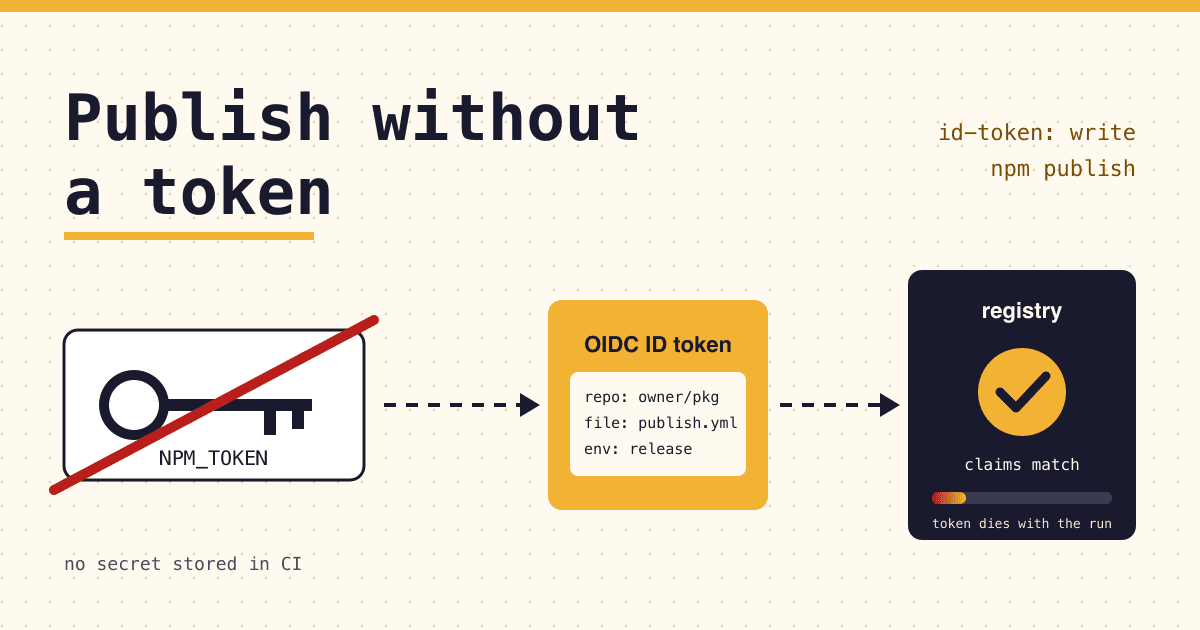
If the NPM_TOKEN secret in your release workflow leaks, whoever holds it can publish a new version of your package from their own machine until it expires or you revoke it. Trusted publishing removes that secret: your CI job proves which repository and workflow it is, npm checks that identity against the publisher you registered for the package, and only then accepts the publish.
Short answer
- On GitHub Actions, GitLab.com or CircleCI cloud: register the workflow as a trusted publisher on npmjs.com, add
id-token: write(or the GitLab and CircleCI equivalent) and remove the token from the publish step. Confirm one release goes out, then deleteNPM_TOKENand set the package to disallow tokens. - On a self-hosted runner or another CI: trusted publishing does not work there yet. Switch to a stage-only token and approve each release with 2FA.
- Why now: npm is targeting January 2027 to remove direct publishing with access tokens.
What is npm trusted publishing?
Trusted publishing lets a CI/CD workflow publish an npm package with OpenID Connect (OIDC) instead of a stored npm token. npm's docs describe it as "eliminating the need for long-lived npm tokens": each publish uses "short-lived, cryptographically-signed tokens that are specific to your workflow and cannot be extracted or reused."
It is not an npm invention. A paper from an Open Source Security Foundation (OpenSSF) working group describes Trusted Publishers as an authentication method any public package registry can adopt: CI exchanges an OIDC identity token for a short-lived, tightly scoped API token. PyPI shipped it first, in April 2023; RubyGems followed in December 2023, then crates.io and npm in July 2025 and NuGet in September 2025. npm's version became generally available on 31 July 2025.
Why move off NPM_TOKEN now?
Because the token path is closing, step by step. On 14 September 2025 GitHub was told about Shai-Hulud, a self-replicating worm that spread through compromised maintainer accounts and stole secrets, npm tokens among them. GitHub removed more than 500 compromised packages and announced that publishing would narrow to three options: local publishing with 2FA, granular tokens limited to seven days, and trusted publishing.
- Jul 2025
Trusted publishing generally available for GitHub Actions and GitLab.com runners.
- Sep 2025
Shai-Hulud. GitHub announces the move away from long-lived tokens.
- Nov 2025
Legacy (classic) access tokens removed. Only granular tokens remain.
- Aug 2026
Bypass-2FA tokens can no longer change email, password, 2FA, tokens or maintainers.
- Sep 2026
Stage-only tokens: CI can submit a version, a maintainer approves it with 2FA.
- Oct 2026
npm stage publishcan create a brand-new package. - Jan 2027
Target date to remove direct publishing with access tokens.
January 2027 is a target, not a promise, and the two sources word its scope differently. The changelog says npm "is targeting" the removal of direct publishing through bypass-2FA tokens. The access token docs say "The ability to publish new package versions directly with a granular access token will be removed in January 2027". Either way, a release job that runs npm publish with a token is on borrowed time.
Token, trusted publisher or stage-only token: which should publish?
Three ways a CI job can still get a version onto the registry, compared on what matters when a secret leaks.
| Granular token, publish | Trusted publisher | Stage-only token | |
|---|---|---|---|
| Secret stored in CI | Yes | None | Yes |
| Works from | Any machine | Only the registered workflow, on a cloud runner | Any machine, but only stages |
| Lifetime | Expiry you set, at least 1 day | Short-lived, per run | Expiry you set, at least 1 day |
| Provenance | Only with --provenance, on GitHub or GitLab cloud runners | Automatic (public repo and package, not CircleCI) | Not covered by the stage-only docs |
| Human approval | No | Optional: allow stage publish only | Always, with 2FA |
| After January 2027 | Direct publish with a token removed (target) | Not part of the announced removal; npm's recommended path | npm's migration path for token-based CI |
The pick is short: use a trusted publisher wherever your CI supports one, and a stage-only token everywhere else.
How does trusted publishing check a workflow?
Nothing secret is stored. Each run asks its CI provider for a fresh identity and trades it for a publish credential that dies with the run.
- CI run
Your workflow starts on a cloud-hosted runner, with permission to request an OIDC ID token (
id-token: writeon GitHub). - CI provider
Issues a signed ID token that names the repository, the workflow file and, if set, the environment.
- npm CLI
Detects the OIDC environment on its own and sends that token to the registry before it falls back to any npm token.
- npm registry
Compares the claims with the trusted publisher you saved for the package. Every field must match exactly, case included.
- Short-lived token
On a match, npm hands back a publish token valid for that workflow only. It cannot be pulled out and reused.
- Provenance
From GitHub Actions or GitLab, with a public repository and a public package, the publish carries a provenance attestation, signed through Sigstore and logged in a public transparency log.
How do you set up trusted publishing on GitHub Actions?
Check the versions
The job needs npm CLI 11.5.1 or later and Node 22.14.0 or later. Print
npm --versionin the job; if it is older, update npm before the publish step.Match
repository.urlThe
repository.urlinpackage.jsonmust match your GitHub repository exactly. Forks that never changed it fail here.Register the publisher
On npmjs.com open the package, then Settings, then Trusted publishing, and pick GitHub Actions. Fill in the owner, the repository, the workflow file name only (
publish.yml, not the path) and the environment if you use one. Choose the allowed actions:npm stage publishis always allowed,npm publishis your choice.Edit the workflow
Grant
id-token: write, run on a GitHub-hosted runner, and removeNODE_AUTH_TOKENfrom the publish step.Publish within 2 days
A new trusted publisher must complete its first successful publish within 2 days, or it expires and has to be deleted and created again.
Lock the door behind you
In the package's Settings, Publishing access, choose "Require two-factor authentication and disallow tokens", then revoke the automation tokens you no longer need.
What does the release workflow look like?
A tag-triggered release, adapted from the example in npm's docs. The only lines that make it trusted are the id-token permission and the absence of any token on the publish step.
.github/workflows/publish.ymlname: Publish
on:
push:
tags: ['v*']
permissions:
id-token: write # lets the job request an OIDC token
contents: read
jobs:
publish:
runs-on: ubuntu-latest # GitHub-hosted, not self-hosted
steps:
- uses: actions/checkout@v6
- uses: actions/setup-node@v6
with:
node-version: '24'
registry-url: 'https://registry.npmjs.org'
package-manager-cache: false
- run: npm ci
- run: npm test
- run: npm publish # no NODE_AUTH_TOKEN herePrefer the command line? With npm 11.15.0 or later, 2FA on your account, write access to a package that already exists, and an interactive login (not a bypass-2FA token), one command does step 3:
npm trust github my-package --file publish.yml --repo my-org/my-package --allow-publishWhy does the publish fail with ENEEDAUTH?
"Unable to authenticate" (ENEEDAUTH) usually means the job's identity or setup does not match what npm expects. Check these in order.
- Workflow file name differs
- Fields are case-sensitive and the name needs its
.ymlor.yamlextension. - Self-hosted runner
- Not supported. Use a GitHub-hosted runner, GitLab.com shared runners or CircleCI cloud.
- No
id-token: write - Without it the job cannot request an OIDC token at all.
- Reusable or manual workflow
- With
workflow_callorworkflow_dispatch, npm checks the calling workflow's name, and both workflows needid-token: write. repository.urlmismatch- It must match the GitHub repository exactly.
npm cifails, not the publish- Trusted publishing covers the publish only. Private dependencies still need a read-only granular token for the install step.
Which path fits your CI?
Does your release job run on GitHub-hosted runners, GitLab.com shared runners or CircleCI cloud?
Yes: use a trusted publisher. Then one more question:
Should a person approve every release before it goes live?
Yes: allow only npm stage publish on the trusted publisher. A maintainer approves each staged version with 2FA, on the CLI or npmjs.com.
No: also allow npm publish, then disallow tokens on the package.
No (self-hosted runner or another CI): create a granular token with "Read and write (stage only)", run npm stage publish, and approve with npm stage approve <stage-id>.
Before you delete the old token
- The trusted publisher has completed one real publish (within its 2-day window).
- If a person should approve each release, the trusted publisher allows
npm stage publishonly. - Every package you publish has its own trusted publisher: the setting is per package.
- Install steps that need private packages use a read-only token, never the old write token.
- Publishing access is set to "Require two-factor authentication and disallow tokens".
- Old automation tokens are revoked on npmjs.com and removed from CI secrets.
Questions maintainers ask
Does trusted publishing work for private and scoped packages?
Yes. At launch npm said it covers all private and public packages, scoped and unscoped. Provenance is the exception: only a public package published from a public repository gets it.
Do I still need the --provenance flag?
No. A trusted publish from GitHub Actions or GitLab adds provenance by default when the repository and package are public. CircleCI publishes carry no provenance yet. You can opt out with NPM_CONFIG_PROVENANCE=false.
Can one package have more than one trusted publisher?
On npmjs.com, yes: up to 10 at the same time, for example GitHub Actions and GitLab side by side. The npm trust command docs still say one configuration per package, so add extra ones on the website. A saved connection cannot be edited: delete it and create a new one.
How do I publish a package that does not exist yet?
npm trust needs an existing package. Since October 2026, npm stage publish can create one, from a local session or a granular token. A public placeholder version, 0.0.0-stage, appears at once; your real first version waits for a maintainer to approve it. Then add the trusted publisher.
Can I use a self-hosted runner?
Not yet. npm says self-hosted runner support is planned for a future release. Until then, use a stage-only token from that runner.
Sources
- npm Docs: Trusted publishing for npm packages
- npm Docs: Staged publishing for npm packages
- npm Docs: About access tokens
- npm Docs: Generating provenance statements
- npm Docs: npm trust
- OpenSSF: Trusted Publishers for All Package Repositories
- GitHub Blog: Our plan for a more secure npm supply chain (22 September 2025)
- GitHub Changelog: npm trusted publishing with OIDC is generally available (31 July 2025)
- GitHub Changelog: Stage-only npm tokens for safer automation (18 September 2026)
- GitHub Changelog: npm staged publishing now supports creating new packages (2 October 2026)
All sources checked on 22 October 2026.