An llms.txt file is a short Markdown file, usually served at /llms.txt, that tells AI agents what your product is and which pages to read, in the order you choose.
Short answer
If you ship a developer tool with docs, add one: a coding agent that reads it finds your quickstart and API reference without crawling your marketing pages. Do not expect it to lift your Google traffic. Google says its AI features need no "AI text files" of any kind (Google Search Central, AI features and your website).
What goes in an llms.txt file?
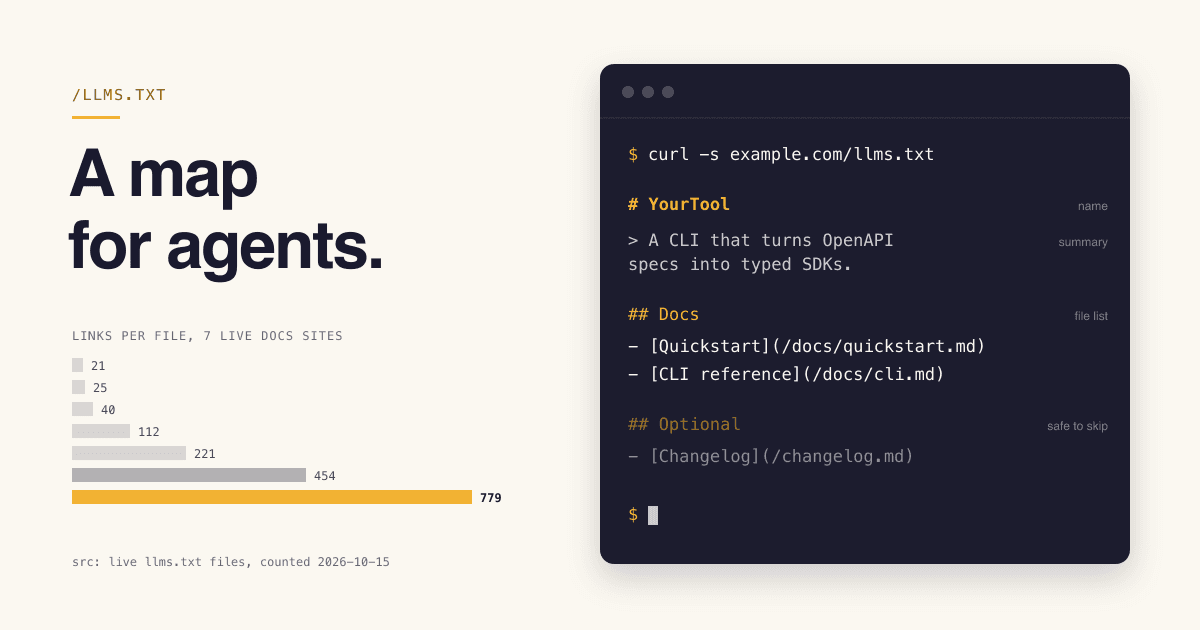
The format comes from the llms.txt proposal by Jeremy Howard, first published in September 2024 and revised as v2 in August 2026. A file has these parts, in this order. Only the first is required; the spec also allows a byte-order mark before it. The example at the top of this page shows each one.
- 1
# NamerequiredAn H1 with the name of the project or site. The spec calls it "the only required section".
- 2
> SummaryoptionalA blockquote with a short summary: what the tool is, who it is for, which language or runtime.
- 3
Notes optional
Any Markdown except headings: paragraphs or lists that tell an agent how to read the rest. This is where you warn about the mistakes agents make with your tool.
- 4
## SectionoptionalH2 sections that each hold a "file list": Markdown links written as
[name](url), each optionally followed by:and a note on what the page answers. - 5
## OptionalconventionA section for secondary links an agent can skip when it needs a shorter context. In v2 this is a convention only, with no special meaning to tools (llms.txt v2 changes).
The file can sit at the site root or at a subpath. In v2, /docs/llms.txt covers everything under /docs/, and when more than one file applies, agents should use the most specific one (llms.txt spec).
Who actually reads llms.txt?
This is the question that decides whether the file is worth your time. Here is what each reader says about it, from its own documentation.
| Reader | Uses llms.txt? | What the source says |
|---|---|---|
| Coding agents and chat assistants | Yes, on demand | The spec says the file is used on demand, when an agent needs information while helping a user (llms.txt spec, Existing standards). Its author adds that "coding agents use them reliably" (llms.txt v2 changes, August 2026). |
| Chrome Lighthouse | Checks it | Its agentic browsing audits flag a page when fetching llms.txt returns a server error. A 404 marks the audit "Not Applicable", "as providing the file is optional at the moment" (Lighthouse llms.txt audit). |
| Google Search AI Overviews and AI Mode | Not needed | "You don't need to create new machine readable files, AI text files, or markup to appear in these features." (Google Search Central) |
| Docs platforms | Generate it | Mintlify hosts an llms.txt and an llms-full.txt at the root of each docs project it hosts, kept up to date automatically (Mintlify docs). |
We found no public documentation from an AI search product saying it uses llms.txt to rank or cite pages. So treat it as a reading guide for agents that already decided to use your docs, not as a way to be found.
How is llms.txt different from robots.txt and sitemap.xml?
All three are plain files at a predictable path, which is why they get confused. They answer three different questions.
robots.txt
What may a bot fetch?
Access rules for crawlers, such as search indexing bots. It is the file to edit if you want to allow or block a crawler.
sitemap.xml
Which pages exist?
Every indexable page, for search engines. Often too large to fit in an LLM context window, and it rarely lists Markdown versions of pages.
llms.txt
What should an agent read first?
A short, curated map with a note per link, read on demand while an agent helps a user. It can link to other sites too.
Source: the "Existing standards" section of the llms.txt spec.
How long should an llms.txt file be?
The spec sets no number: it says the file "stays small enough to fit in context" while the detail lives behind the links. Real files vary a lot. We counted the links in seven published files on 15 October 2026:
| File | Links | Size |
|---|---|---|
| FastHTML docs | 21 | 4.7 KB |
| Vercel docs | 25 | 4.8 KB |
| OpenAI developers | 40 | 6.1 KB |
| Mintlify docs | 112 | 22.7 KB |
| Gemini API docs | 221 | 36.7 KB |
| Stripe docs | 454 | 90.6 KB |
| Anthropic developer docs | 779 | 83.5 KB |
Two styles show up. The small files are curated maps: the pages a newcomer needs, each with a one-line note. The large ones list nearly every docs page. For a young tool with a few dozen docs pages, the curated style is the one you can keep accurate by hand.
Which llms.txt myths cost developers time?
Myth You need llms.txt to show up in Google's AI Overviews.
Fact Google says no new machine-readable files, AI text files or markup are needed, and no special structured data either (Google Search Central).
Myth llms.txt keeps AI companies from training on your docs.
Fact It grants or blocks nothing. The spec separates the two: robots.txt says what access is acceptable, llms.txt is context used on demand (llms.txt spec).
Myth Without llms.txt, your site fails a Lighthouse audit.
Fact A missing file (404) is "Not Applicable". A server error when Lighthouse fetches it is what gets flagged (Lighthouse).
How do I write an llms.txt for my developer tool?
Pick the path
Docs on their own path? Put the file at
/docs/llms.txtso it covers only the docs. Otherwise use/llms.txt. Lighthouse's docs tell you to use the root, so a file only at a subpath, valid under the spec, may show as "Not Applicable" there.Write the H1 and one summary line
Name the tool, say what it does, for whom, and in which language or runtime. One sentence a stranger understands.
Add the notes agents get wrong
Renamed commands, breaking versions, frameworks you do not support. FastHTML's file warns that it is "not compatible with FastAPI syntax" (FastHTML llms.txt); Stripe's opens by telling agents to check npm for the latest package version (Stripe llms.txt).
Group your best pages under H2s
Docs, API reference, Examples. Give every link a note that says what question the page answers. Move the nice-to-haves into
## Optional.Point links at clean text
The spec suggests a clean Markdown version of the pages agents need, at the same URL with
.mdappended (page.html.md) or replacing the extension (page.md). v2 adds link relations so agents can find them:rel="alternate" type="text/markdown"for the Markdown page andrel="describedby"for the llms.txt that covers it, as HTML links or an HTTPLinkheader (llms.txt spec).Test it with an agent
The spec's own advice: give an agent only your llms.txt and ask it questions about your product. Most wrong answers point to a missing note or link.
Generate it on every docs deploy
A stale map is worse than none. Docs platforms such as Mintlify generate the file for you; Mintlify's lists every page, and you can replace it with your own curated file at the project root (Mintlify docs). The spec also lists plugins for Docusaurus, VitePress and Drupal (llms.txt integrations).
What should I check before I ship it?
- The URL returns 200, never a server error: a 5xx is what Lighthouse flags.
- The first line is the H1 with your product name.
- The summary is one plain sentence, with no slogan in it.
- Every link opens, and most point to Markdown or clean text pages.
- Each link has a note saying what the page answers.
- Nothing in it promises a feature the product does not have.
- Your build or docs platform regenerates it, so it never lags the docs.
Your listing is the other half. llms.txt helps an agent that already found your docs. People and assistants still need to find the product first, and a clear public page with a one-line description, category and link does that job. CodeTrendy publishes its own llms.txt, with its categories, guides and articles.
llms.txt questions developers ask
Is llms.txt an official web standard?
No. It is a proposal by Jeremy Howard, open for community input in a public GitHub repository. It is not an IETF or W3C standard. It sits at a plain path rather than under /.well-known/ so that sites that only control a subpath, such as a GitHub Pages project, can publish one too.
What is llms-full.txt?
A convention outside the spec: one file with the full Markdown text of every page. Mintlify, for example, serves it next to llms.txt, with each page's title, URL, description and content (Mintlify docs). The llms.txt spec itself only describes the short map.
Do the AI companies publish llms.txt files themselves?
Yes, for their developer docs: OpenAI, Anthropic and Google Gemini API all serve one. The spec links all three; Anthropic's old docs address now redirects to the file linked here.
Should a SaaS without public docs bother?
The spec says the format works beyond docs, for example a business outlining its structure and policies. Without docs, though, there is little for an agent to follow. Write a short file with your pricing, product and help pages, and spend the rest of the hour on those pages.
Sources
- The /llms.txt file, v2, Jeremy Howard, llmstxt.org, first published 2024-09-03.
- llms.txt Changes, v2 (August 2026), llmstxt.org.
- AI features and your website, Google Search Central, last updated 2025-12-10.
- llms.txt audit, Lighthouse docs, Chrome for Developers, last updated 2026-05-05.
- llms.txt, Mintlify documentation.
- Link counts and sizes: the seven live files linked in the table above, fetched on 2026-10-15.