What does someone need to read before they upgrade your tool? A changelog: one file, usually CHANGELOG.md, that lists the notable changes of every version in plain words, newest first, each with its date, next to a Semantic Versioning number that tells them at a glance whether the upgrade can break their code.
This page is laid out like a changelog. Each section is one release, from 0.1.0 to 1.0.0, and every rule in it links to the spec it comes from.
0.1.0 Added three words that get mixed up
What is the difference between a changelog, release notes and a commit log?
Keep a Changelog defines it this way: "A changelog is a file which contains a curated, chronologically ordered list of notable changes for each version of a project" (Keep a Changelog 1.1.0). The key word is curated: someone picked what matters to users.
Commit log
Every commit, in the order it landed. Merge commits, typo fixes and refactors included.
Changelog
A file in the repo with an entry for every version, grouped by type of change, newest on top.
Release notes
The text published with one release, for example on a GitHub release page or a blog post.
Release notes are worth the effort. A study of 32,425 release notes from 1,000 GitHub projects, plus interviews with 15 practitioners and a survey of 314 people, found that stakeholders see well-formed release notes as good for development, and that different stakeholders differ significantly on how release notes should be written and used (Bi et al., IEEE TSE, 2022).
Keep the file even if you publish GitHub releases: Keep a Changelog points out that GitHub Releases "create a non-portable changelog that can only be displayed to users within the context of GitHub."
0.2.0 Added the six change types
What goes into each changelog entry?
Group every change under one of six headings. The definitions are Keep a Changelog's; the example lines are ours.
| Heading | Use it for | Example line |
|---|---|---|
| Added | new features | --json flag on the export command |
| Changed | changes in existing functionality | Default timeout raised from 10 s to 30 s |
| Deprecated | soon-to-be removed features | --legacy output, removed in 3.0.0 |
| Removed | now removed features | Support for config files in INI format |
| Fixed | any bug fixes | Crash when the project path has a space |
| Security | vulnerabilities | Tokens no longer written to debug logs |
Change types and their definitions from Keep a Changelog 1.1.0. Example lines are made up for a fictional CLI.
Around those headings, the same spec recommends four more things:
- An Unreleased section on top. Add entries as you merge, then rename it to the new version at release time.
- A date on every version, written year first, like
2026-10-17. It sorts correctly and it is an ISO standard. - Linkable versions, so you can send someone a link to one release, for example a compare link between two tags.
- A line saying whether you follow Semantic Versioning.
0.3.0 Added a way to pick the number
How do you pick the next version number?
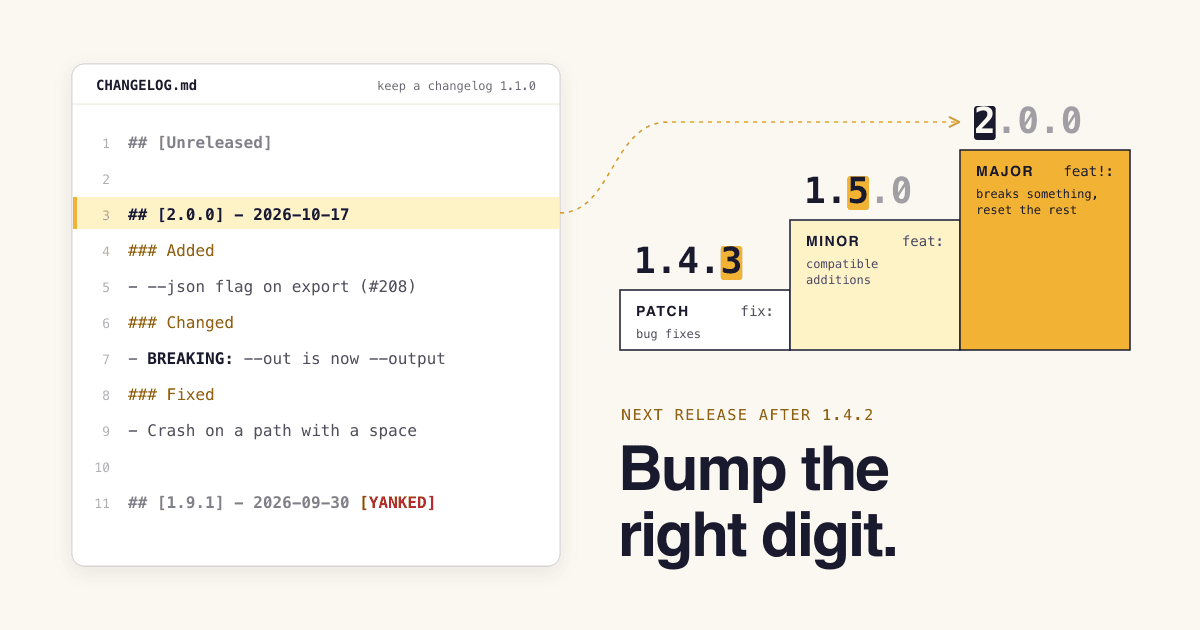
Semantic Versioning 2.0.0 gives every release a number in the form MAJOR.MINOR.PATCH (semver.org). Ask these questions about everything since the last release, in this order, and stop at the first yes:
Can code that worked with the last release break? A removed or renamed option, a changed output format, a new required argument.
Yes: bump MAJOR and reset the other two. 1.4.2 becomes 2.0.0.
Did you add something that works without changes on the user's side, or mark something as deprecated?
Yes: bump MINOR and reset PATCH. 1.4.2 becomes 1.5.0.
Did you only fix bugs, without changing how anything is called?
Yes: bump PATCH. 1.4.2 becomes 1.4.3.
Deprecations count as MINOR because the spec says the minor version "MUST be incremented if any public API functionality is marked as deprecated." Its FAQ adds that at least one minor release should carry the deprecation before a major release removes it.
Two more rules from the spec:
- Released means frozen. "Once a versioned package has been released, the contents of that version MUST NOT be modified." A fix is a new version.
- Test a release under a pre-release tag. A hyphen marks it, and it sorts before the real thing:
2.0.0-alpha < 2.0.0-beta.2 < 2.0.0-rc.1 < 2.0.0. Build metadata after a plus sign, like2.0.0+20261017, is ignored when versions are compared.
0.4.0 Changed what 0.x means to npm
Why does ^0.2.3 not install 0.3.0?
Because npm's caret range never moves the left-most digit that is not zero. In the words of the node-semver README, it allows "patch and minor updates for versions 1.0.0 and above, patch updates for versions 0.X >=0.1.0, and no updates for versions 0.0.X" (npm/node-semver).
| Range | 0.0.3 | 0.0.4 | 0.2.3 | 0.2.9 | 0.3.0 | 1.2.3 | 1.2.9 | 1.3.0 | 2.0.0 |
|---|---|---|---|---|---|---|---|---|---|
| ^1.2.3 | no | no | no | no | no | yes | yes | yes | no |
| ~1.2.3 | no | no | no | no | no | yes | yes | no | no |
| ^0.2.3 | no | no | yes | yes | no | no | no | no | no |
| ^0.0.3 | yes | no | no | no | no | no | no | no | no |
Which sample versions four npm ranges accept, worked out from the range rules in the node-semver README. Ranges are shown simplified: the README writes upper limits as, for example, <2.0.0-0.
In short: ^1.2.3 takes anything below 2.0.0, ~1.2.3 stays below 1.3.0, ^0.2.3 stays below 0.3.0, and ^0.0.3 takes only 0.0.3.
This matters because the caret is the default. npm's save-prefix setting is ^, so npm install <package> writes a range like ^1.2.3 into package.json, which "allows minor upgrades for that package" (npm config docs). Once you are past 1.0.0, a breaking change shipped as a minor release reaches users who never asked for it. Below 1.0.0, the minor digit acts as your breaking-change signal for npm users, which is why, as the README notes, "many authors treat a 0.x version as if the x were the major 'breaking-change' indicator."
0.5.0 Removed the git log dump
What does a good changelog entry look like?
Keep a Changelog's first warning is about pasting commits: "Using commit log diffs as changelogs is a bad idea: they're full of noise." Compare the same release written both ways.
Before: git log, pastednoise
a41f2c3 Merge pull request #212 from fix-path
9be01d7 wip
c3d88e1 fix tests
70aa5f2 update deps
e19b4c0 rename --out to --output
5d2f9a8 add json export
After: CHANGELOG.mdKeep a Changelog style
## [Unreleased]

## [2.0.0] - 2026-10-17
### Added
- --json flag on the export command (#208)
### Changed
- BREAKING: --out is now --output (#211)
### Fixed
- Crash when the project path has a space (#212)

## [1.9.1] - 2026-09-30 [YANKED]

[unreleased]: https://github.com/OWNER/REPO/compare/v2.0.0...HEAD
[2.0.0]: https://github.com/OWNER/REPO/compare/v1.9.1...v2.0.0
The second version says what changed for the user, puts the breaking change where nobody can miss it, references each line's pull request, and keeps the yanked release visible. Keep a Changelog asks for that last part: pulled releases "should" appear, and "the [YANKED] tag is loud for a reason."
Want stricter rules? Common Changelog, "a stricter subset of Keep a Changelog", asks for every change to start with a present-tense verb ("Add", "Fix"), to reference its commit, and to mark breaking changes with a bold **Breaking:** prefix, listed first within their category. It drops the Unreleased section and the Deprecated and Security headings.
0.6.0 Added automation, with a human edit
Can you generate a changelog from your commits?
Yes, if the commits carry the information. Conventional Commits 1.0.0 is a widely used format: <type>[optional scope]: <description>, and the type maps to a version bump (conventionalcommits.org).
Commit type to version
fix: ...bumps PATCHfeat: ...bumps MINORfeat!: ...bumps MAJOR- A
BREAKING CHANGE:footer, on any type, bumps MAJOR docs:,chore:,ci:and other types: no bump on their own
The extra types come from @commitlint/config-conventional, based on the Angular convention. The spec allows them but gives them "no implicit effect in Semantic Versioning".
Tools that draft the notes
- release-please: opens a release pull request; merging it updates the changelog, tags the commit and creates a GitHub release. It does not publish to package managers.
- semantic-release: picks the next version, writes release notes and publishes the package, all in CI.
- Changesets: contributors add a small file saying how their change should be released, and the tool reads those files, not commit messages; it has "a focus on monorepos".
- GitHub generated notes: one click on the release form lists merged pull requests, contributors and a full-changelog link, grouped by labels you set in
.github/release.yml. It reads pull request titles and labels, not commit messages.
Treat what they produce as a draft. GitHub's own docs say to check that the generated notes "include all (and only) the information you want to include." A list of pull request titles is still a commit log with better formatting; the Deprecated and breaking lines are the ones to rewrite by hand.
0.7.0 Fixed the release-day misses
What should you check before each release?
Run this list before you tag. Each line comes from the specs above.
- The Unreleased section is renamed to the new version and today's date, and a fresh empty one sits on top.
- Every breaking change, deprecation and removal is listed. Keep a Changelog: "If you do nothing else, list deprecations, removals, and any breaking changes in your changelog."
- The version bump matches the biggest change in the list, not the size of the diff.
- Nothing was cut: "A changelog which only mentions some of the changes can be as dangerous as not having a changelog."
- The tag points at a new version. A released version is never rebuilt or re-tagged. On GitHub, immutable releases, if you turn them on, lock the tag and assets, but you "can still edit the title and release notes" (GitHub Docs).
- Security fixes sit under Security, so people scanning for them find them.
1.0.0 Changed the promise you make
When is your tool ready for 1.0.0?
As soon as people rely on it. Major version zero "is for initial development. Anything MAY change at any time." The spec's FAQ suggests starting at 0.1.0 and bumping the minor version for each release, then says:
"If your software is being used in production, it should probably already be 1.0.0."
Semantic Versioning 2.0.0, FAQ
Version 1.0.0 "defines the public API": from then on a breaking change costs a major version, and users can trust a minor or patch update. If you ever ship a breaking change by mistake in a minor release, the FAQ's answer is to release a new minor version that restores compatibility, never to edit the broken one, and to tell your users which version to avoid.
Changelog questions, answered
- What should the file be called?
CHANGELOG.md. Keep a Changelog: "Call it CHANGELOG.md. Some projects use HISTORY, NEWS or RELEASES."- Do I need a changelog if I publish GitHub releases?
- Keep both if you can. The file lives in your repository, so it is in every clone, fork and source download, while Keep a Changelog notes that GitHub Releases "can only be displayed to users within the context of GitHub."
- Is a deprecation a minor or a major change?
- Minor, once you are past 1.0.0. Semantic Versioning requires a minor bump when you mark public API as deprecated, and the removal comes later in a major release.
- Can I edit an old changelog entry?
- Yes. Keep a Changelog answers "Should you ever rewrite a changelog?" with "Sure." What you must not change is the released code under a version number.
- Should I list documentation and dependency updates?
- Only when a user would notice. Keep a Changelog's Security heading is for changes made "in case of vulnerabilities", so a dependency bump that fixes one belongs there; a typo fix in the docs does not need a line.
Sources
- Keep a Changelog 1.1.0, Olivier Lacan.
- Semantic Versioning 2.0.0, Tom Preston-Werner.
- Conventional Commits 1.0.0; @commitlint/config-conventional README.
- npm/node-semver README (range rules); npm config: save-prefix, npm Docs.
- Automatically generated release notes and Immutable releases, GitHub Docs.
- READMEs of release-please, semantic-release, Changesets and Common Changelog.
- Bi, Xia, Lo, Grundy, Zimmermann, An Empirical Study of Release Note Production and Usage in Practice, IEEE Transactions on Software Engineering 48(6), 2022 (abstract).
- All pages read on 2026-10-17.