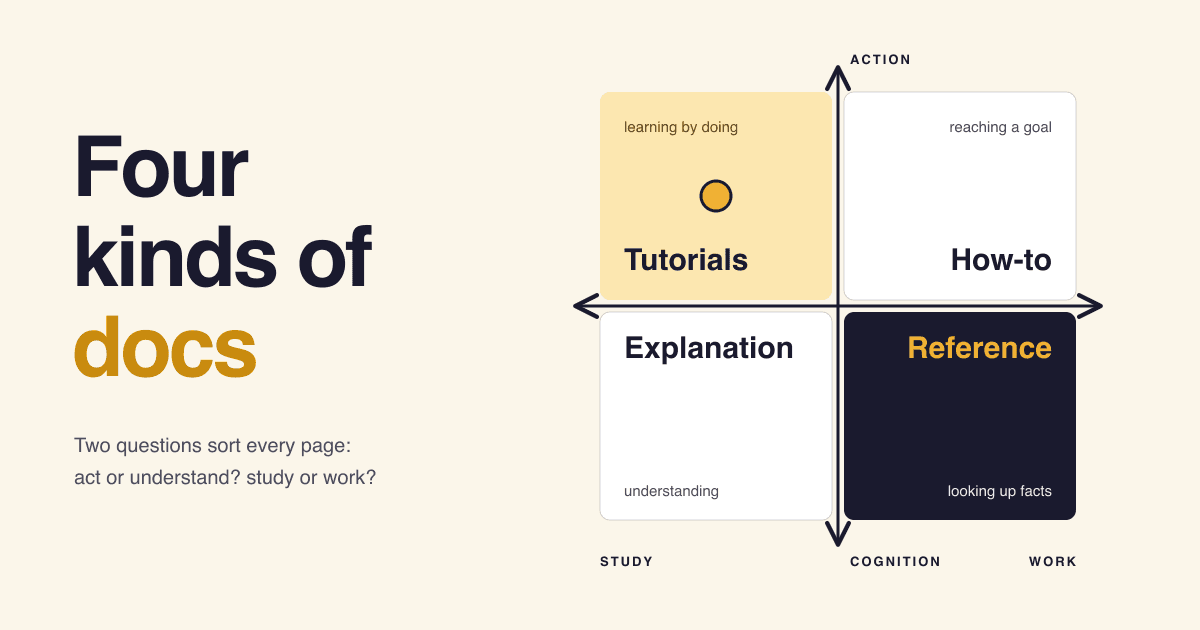
Sort every page of your developer docs with two questions about its reader: do they need to act or to understand, and are they learning or getting work done? The four answers are the four kinds of page in the Diátaxis framework: tutorials, how-to guides, reference and explanation. Keep each page to one kind and readers find what they came for.
Short answer
- Tutorial: a lesson for a beginner. One path, a working result.
- How-to guide: steps for someone who already knows the product and has a job to do.
- Reference: the facts, looked up mid-task. API, CLI flags, limits.
- Explanation: the why: background, design decisions, trade-offs.
From the Diátaxis compass and Start here pages, read on 2026-10-20.
What is Diátaxis?
Diátaxis is a framework for writing and organizing technical documentation around what the reader needs at that moment. Its own site calls it "a systematic approach to technical documentation authoring" and "a way of thinking about and doing documentation" (diataxis.fr). It is the work of Daniele Procida, who presented an earlier version of the ideas while working at Divio between 2014 and 2021 (Diátaxis colophon).
The idea fits on one map. Two lines cross: one separates action (the page tells you what to do) from cognition (the page tells you what is true, or why). The other separates acquisition (you are studying, building skill) from application (you are at work, using skill). Each of the four corners is one kind of page.
Action: what to do
Cognition: what is true, and why
Study
Work
- Tutorialslearning by doing
- How-to guidesreaching a goal
- Explanationunderstanding
- Referencelooking up facts
The map also shows where docs go wrong. Each kind has a natural pull towards its neighbours, and the Diátaxis map page warns that when the lines blur, "the different kinds of documentation bleed into each other". In the worst case tutorials and how-to guides collapse into each other, and the page serves neither reader (The map).
Several hundred projects use Diátaxis, according to its colophon, which says listing every adopter is no longer possible (Diátaxis colophon).
Which kind of page is this one?
Diátaxis calls this tool the compass: "something like a truth-table or decision-tree of documentation" that needs "just two questions" (The compass). Open the questions in order.
Question 1. Does the page tell the reader what to do?
Yes, it informs action. Question 2: is the reader learning the product, or using it for real work?
Learning: a tutorialThe writer is the teacher and carries the responsibility. One safe path, no choices.
Working: a how-to guideThe reader is competent and owns the outcome. Steps toward their goal.
No, it informs cognition. Question 2: is the reader studying, or checking a fact while they work?
Studying: explanationContext and reasons, read away from the task.
Working: referenceNeutral description, consulted in the middle of a task.
The pairs come from the compass table: action and acquisition is a tutorial, action and application a how-to guide, cognition and application reference, cognition and acquisition explanation (The compass). A quick test for the bottom row, from Reference and explanation: would someone turn to this page "while actually getting something done"? Then it is reference.
What goes in each kind of page?
Each kind has its own reader, its own title pattern and its own things to leave out. The rules below are condensed from the four Diátaxis type pages.
Tutorials: a lesson with a guaranteed result
"A tutorial is a lesson, that takes a student by the hand through a learning experience." (Start here)
- Reader
- New to the product, at study.
- Title
- What they will build: "Build your first ..."
- Show where the lesson ends before it starts.
- Make every step produce a visible result, however small.
- Ignore options and alternatives; follow one line.
- Aim for perfect reliability: it must work every time.
Keep out: explanation. "A tutorial is not the place for explanation." Link to it instead (Tutorials).
How-to guides: directions for a real goal
"A how-to guide addresses a real-world goal or problem, by providing practical directions to help the user who is in that situation." (Start here)
- Reader
- Already competent, at work.
- Title
- "How to ..." plus the exact goal.
- Address real-world complexity: setups differ, say where.
- Give a set of instructions in a logical sequence.
- Omit the unnecessary: no lesson, no history.
Name it precisely. Diátaxis rates "How to integrate application performance monitoring" good, "Integrating application performance monitoring" bad and "Application performance monitoring" very bad, because only the first promises steps (How-to guides).
Explanation: the why, from a step back
"Explanatory guides provide context and background." (Start here)
- Reader
- Away from the keyboard, wants to understand.
- Title
- Starts with "About": "About user authentication".
- Give the context: design decisions, history, constraints.
- Make connections, also to things outside the topic.
- Admit opinion and weigh the alternatives.
Keep it bounded. Explanation "tends to absorb other things"; push steps and specs out to their own pages. The section may be called Background, Topics or Discussion instead of Explanation (Explanation).
Reference: the facts, in the shape of the product
"Reference guides contain the technical description - facts - that a user needs in order to do things correctly." (Start here)
- Reader
- Mid-task, needs one fact fast.
- Title
- The thing itself: "CLI flags", "Rate limits".
- Describe and only describe: "Neutral description is the key imperative."
- Adopt standard patterns, so every entry reads the same way.
- Follow the structure of the product itself (Diátaxis: "the structure of the machinery").
- Add short examples of use.
Keep out: instructions and opinion. Those belong in a how-to guide or in explanation (Reference).
How do the four kinds compare side by side?
| Kind | Oriented to | The reader is | Who is responsible | Name in Django's docs |
|---|---|---|---|---|
| Tutorial | Learning | At study, new | The writer, as teacher | Tutorials |
| How-to guide | Goals | At work, competent | The reader | How-to guides |
| Reference | Information | At work, mid-task | The reader | Reference guides |
| Explanation | Understanding | At study, reflecting | The reader | Topic guides |
Sources: "oriented to" from The map; responsibility from Tutorials and how-to guides ("In a tutorial, responsibility lies with the teacher"); Django names from the "How the documentation is organized" section of the Django documentation home page. The "who is responsible" cells for reference and explanation are our reading, not a Diátaxis quote.
Where would you file these six pages?
Six page titles you could find in any API product's docs. Guess the kind, then hover over a card or move to it with the keyboard to turn it. On a touch screen the answer sits under each title.
- Page 1Build and deploy your first webhook receiverTurn the card TutorialThe reader is new and learning. One guided path, a working result at the end.
- Page 2How to rotate an API key without downtimeTurn the card How-to guideThe reader already uses the product and has one job to finish.
- Page 3CLI flags and environment variablesTurn the card ReferenceLooked up in the middle of work: facts, complete, in a fixed order.
- Page 4About webhook signatures: why we sign every payloadTurn the card ExplanationRead away from the keyboard, to understand a design decision.
- Page 5Fix 502 errors behind a reverse proxyTurn the card How-to guideA real problem in a real setup. Steps, no lesson.
- Page 6Rate limits by planTurn the card ReferenceA table someone checks while they code. No story, no opinion.
Example titles written for this post. Each answer follows the two compass questions above.
Who structures their docs this way?
Django
The docs home page splits everything into tutorials that "take you by the hand", topic guides that "provide useful background information and explanation", reference guides for APIs and how-to guides that "are recipes" (Django documentation). Four doors, one per kind.
Canonical (Ubuntu)
On 15 December 2021 Canonical announced: "We are adopting the Diátaxis documentation framework" (Canonical blog). Its current style guide still says: "Use Diátaxis to structure product documentation" (Ubuntu documentation style guide).
More teams
The Diátaxis home page carries quotes from documentation people at Cloudflare, Gatsby and Vonage (diataxis.fr).
How do you move docs you already have to Diátaxis?
Not with a big restructure. The Diátaxis workflow says it "changes the structure of your documentation from the inside" and that using it "means not spending energy trying to get its structure correct" (Workflow). Its loop has four steps, then starts again:
- Choose somethingAny page, section or paragraph in front of you. If nothing is already bothering you, "don't go looking for outstanding problems".
- Assess itAsk the two compass questions. Which kind is it trying to be, and what in it belongs elsewhere?
- Decide what to do"What single next action will produce an immediate improvement here?"
- Do itFinish it and publish it. Small steps are worth shipping at once.
Then go back to the beginning of the cycle. The four sections appear as the pages get cleaner.
The common mistake
Creating four empty sections called Tutorials, How-to guides, Reference and Explanation on day one. The workflow page answers that directly: "Don't do that. It's horrible." (Workflow)
A practical first move for a small product, as our suggestion: take your longest "Getting started" page and mark every paragraph with one of the four kinds. The paragraphs that are not tutorial usually become the first how-to guide and the first reference page.
Questions developers ask about Diátaxis
Is Diátaxis tied to a docs tool or a language?
No. Diátaxis calls itself "a way of thinking about and doing documentation" and says: "It doesn't impose implementation constraints" (diataxis.fr). The same four kinds work in a folder of Markdown files or in any docs site generator.
Do my sections have to be called Tutorials, How-to guides, Reference and Explanation?
No. The explanation page itself suggests other names for that section, such as Background, Discussion, Conceptual guides or Topics (Explanation). Django calls it Topic guides. What matters is that each page serves one kind of need.
Is generated API documentation enough as reference?
It is a start, because reference should mirror the structure of the product, and code-generated docs do that. Diátaxis also asks reference to follow standard patterns and to provide examples, so plan to add examples by hand where the generator leaves them out (Reference).
What is the difference between a tutorial and a how-to guide?
"Tutorials are learning-oriented, and how-to guides are task-oriented." A tutorial protects a beginner on one safe path; a how-to guide serves someone who already knows the product and owns the result (Tutorials and how-to guides).
Sources
- Diátaxis, home page: definition, adopter quotes.
- Diátaxis, Start here: one-line definitions of the four kinds.
- Diátaxis, The compass: the two questions and the four answers.
- Diátaxis, The map: orientation of each kind, neighbouring kinds that blur.
- Tutorials, How-to guides, Reference, Explanation: writing principles per kind.
- Tutorials and how-to guides and Reference and explanation: how to tell neighbours apart.
- Diátaxis, Workflow: improving existing docs step by step.
- Diátaxis, Colophon: author, history, "several hundred projects".
- Django documentation home page: how the documentation is organized.
- Canonical, "Diátaxis, a new foundation for Canonical documentation", 15 December 2021.
- Ubuntu documentation style guide.
- All pages read on 2026-10-20.