Saturday night. A stranger has cloned your repo and opens the Issues tab.
The first open ticket reads "Improve error handling". Nothing says where, what done looks like, or whether it takes an hour or a month, so the stranger closes the tab. A good first issue answers those three questions before anyone has to ask.
This post takes one invented ticket from a made-up project and rewrites it, then covers where GitHub shows the good first issue label and how to stop writing vague tickets by accident. Facts about GitHub come from its docs, read on 10 November 2026.
The ticket nobody takes
Title: Improve error handling
Labels: good first issue

The config parser has bad error handling.
Someone should look at it.
The label is on, so the ticket claims to be easy. It is not: the reader must find the parser, decide what "bad" means and invent the fix and its test. Labeling a ticket does not make it approachable. Writing it does.
The same ticket, rewritten
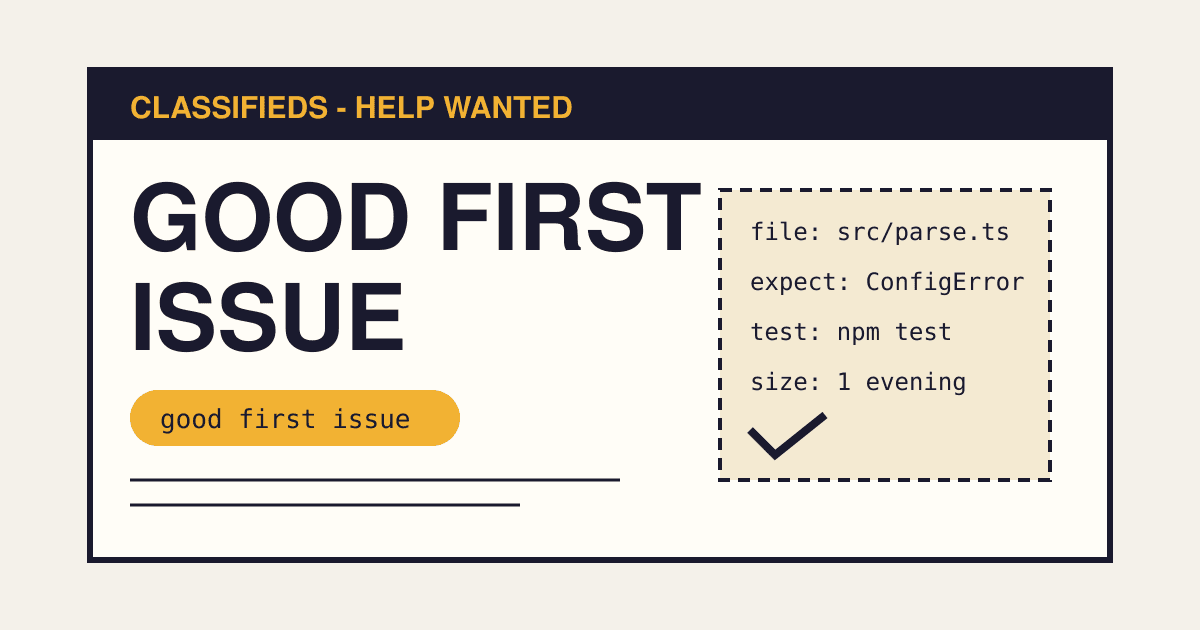
Title: parseConfig() throws a bare TypeError when the file is missing
Labels: good first issue, help wanted

What happens
  parseConfig("missing.json") throws:
  TypeError: Cannot read properties of undefined (reading 'trim')

What we want
  A ConfigError with the message: Config file not found: missing.json

Where to look
  src/config/parse.ts, the readFile() call on line 14
  tests/parse.test.ts has two similar cases to copy

How to check your work
  npm test          (the new test must fail before your change)

Size: about one evening. No design decisions needed.
Ask here if you are stuck. A maintainer replies within two days.
What each line is for
| Line | The question it answers |
|---|---|
| Title with the real error | What is wrong? A stranger can search the exact message. |
| What happens / what we want | What does done look like? One input, one expected output. |
| Where to look | Where do I start? A file, a line and a test to copy. |
| How to check your work | How do I know I am finished? One command. |
| Size and "no design decisions" | Is this safe to start? The reader knows the scope before cloning. |
| Who answers, and when | Will anyone notice my pull request? |
The six-point check before you add the label
- The title names a symptom or a result, not a topic like "improve" or "refactor".
- One input and one expected output are written down.
- At least one file path is named.
- A command proves the fix. Ideally a test that fails first.
- No open question needs the maintainer's decision. If one does, settle it in the ticket first.
- You can finish it yourself in under an hour. That is a fair test of whether a stranger can finish it in an evening.
Where GitHub shows the label
GitHub says you can apply the good first issue label to issues in a public repository so people can find them when searching by label. It also says it uses an algorithm to pick the most approachable issues in each repository and surface them in various places, and that adding the label can increase the likelihood that yours are surfaced.
The label is one of GitHub's default labels, described as "Indicates a good issue for first-time contributors", next to help wanted. Issues carrying it populate the repository's contribute page. Repositories created a while ago, or whose owners edited the defaults, may not have it: check the Labels page and create it if it is missing.
The label gets a stranger to the ticket. The ticket text keeps them there.
Point newcomers somewhere: CONTRIBUTING.md
GitHub shows a link to your contributing guidelines when someone opens an issue or a pull request, on the repository's contribute page, in a Contributing tab next to the README and code of conduct, and in the sidebar. The file can live in the root, docs or .github. If a repository has more than one, GitHub picks the .github one first, then the root, then docs.
Keep it short enough to read on a phone: how to run the tests, how to name a branch, and a link to your good first issues.
Stop vague tickets at the source with an issue form
Issue forms are YAML files in .github/ISSUE_TEMPLATE. GitHub marks them as public preview, so check the current syntax before copying. This sketch asks the reporter for the fields a newcomer needs, and tags the ticket for you to review:
# .github/ISSUE_TEMPLATE/small-task.yml
name: Small task
description: A scoped task a newcomer could pick up.
labels: ["help wanted"]
body:
  - type: textarea
    id: now
    attributes:
      label: What happens now
    validations:
      required: true
  - type: textarea
    id: want
    attributes:
      label: What should happen
    validations:
      required: true
  - type: input
    id: where
    attributes:
      label: Where to look (file path)
  - type: input
    id: check
    attributes:
      label: Command that proves it is fixed
It leaves out good first issue on purpose. Add that label by hand, after you run the six-point check.
Then answer fast
Open Source Guides says a Mozilla study found that contributors who received code reviews within 48 hours came back and contributed again at a much higher rate. We did not open the study itself, so treat that as the guide's claim. The advice that follows from it needs no number: a reply that says "thanks, I will look this week" costs a minute and keeps the contributor.
Questions
How many good first issues should I keep open?
Enough that a newcomer has a choice, and no more than you can answer quickly. Three well written tickets beat thirty vague ones. GitHub gives no official target.
Should I assign the issue to the first person who asks?
That is your call. A short comment such as "go ahead, this is yours for two weeks" prevents duplicate work and tells you when to free the ticket again.
My project has no easy tasks.
Documentation fixes, a missing test for an existing function and a clearer error message are the usual starting points. The rewritten ticket above is the third kind.