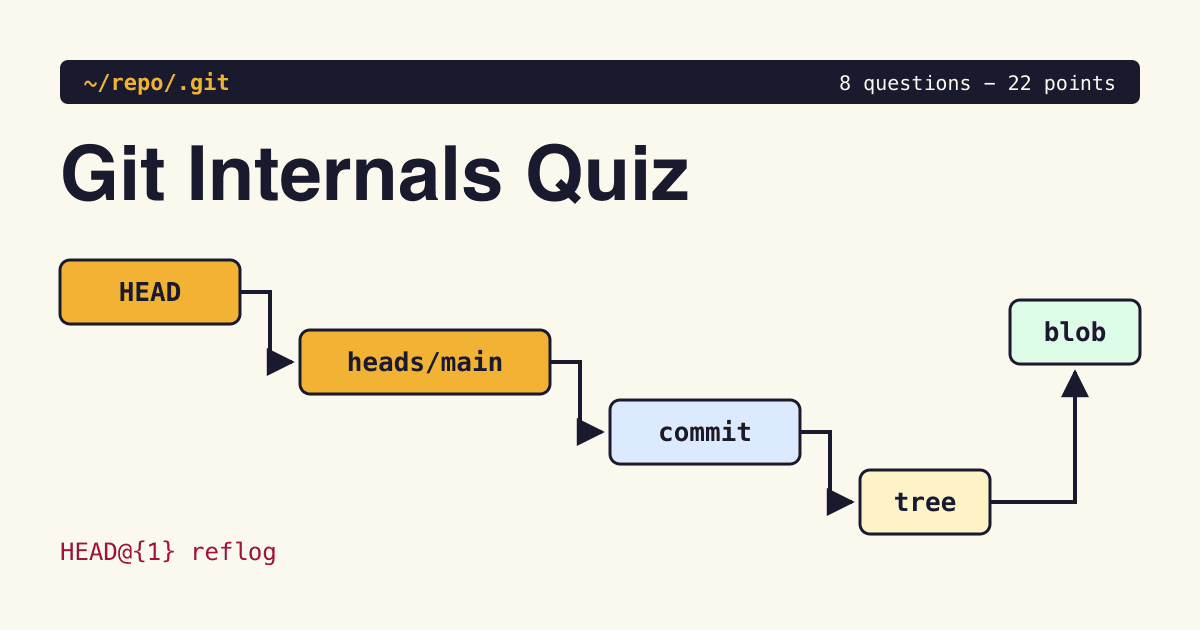
Answer each question in your head or on scrap paper first, then open the answer under it and count the points shown. There are 8 questions and 22 points, and you need nothing but a terminal with Git installed. The examples use a scratch repository with SHA-1 objects and the files ref backend. Commit hashes, identities and timestamps vary between repositories; the blob hash is reproducible.
- Time allowed: about 15 minutes.
- Each question shows its points and the kind of object or ref it is about.
- Commands in an answer are safe to run in a throwaway directory.
The repository behind the outputs, built in this order:
$ git init -b main quiz && cd quiz
$ echo hello > a.txt && git add a.txt && git commit -m one
# Questions 1 to 4 read this state
$ git tag -a v1 -m rel && git tag v1-light
$ git commit --amend -m two
$ git pack-refs --all
Question 1: Same file, another machine
blobQ1 / 8
2 pointsOn your laptop, echo 'hello' | git hash-object --stdin prints ce013625030ba8dba906f756967f9e9ca394464a. A colleague runs the same command in a different repository on another computer. Do they get the same hash? Say why.
Show answer
Yes, the same hash (1 point). A blob's name is computed from its type, size and bytes, not from the repository, the path, the time or the user (1 point). The Pro Git chapter on Git objects shows the recipe: a header of the type, a space, the size in bytes and a null byte, followed by the content, hashed with SHA-1. You can rebuild it yourself:
$ printf 'blob 6\0hello\n' | sha1sum
ce013625030ba8dba906f756967f9e9ca394464a  -
On an older macOS without sha1sum, pipe into shasum instead; it prints the same hash.
Note: the answer changes in a repository created with git init --object-format=sha256, which git init supports. The hash function transition document explains why Git picked SHA-256 as the successor hash.
Question 2: Name the four object types
objectsQ2 / 8
4 pointsGit stores four logical object types, whether loose or packed. Name them, and say in a few words what each one holds.
Show answer
One point each:
- blob: the bytes of a file, and nothing else.
- tree: a directory listing. Each entry stores a mode, an object ID and a name; the mode identifies the kind of entry.
- commit: one tree, zero or more parents, author, committer and message.
- tag (annotated): a named, signed or unsigned pointer to another object, with its own message.
The Pro Git chapter on references calls blobs, trees and commits the three main types and the annotated tag the fourth. Check any object with git cat-file -t <hash>.
Question 3: Where does the filename live?
treeQ3 / 8
2 pointsYou commit one file, a.txt, containing hello. Is the name a.txt stored in the blob, in the tree or in the commit?
Show answer
In the tree (1 point). The blob holds content only, which is why two files with the same bytes share one blob (1 point). Print the tree of the last commit and you see the name beside the blob hash from Question 1:
$ git cat-file -p 'HEAD^{tree}'
100644 blob ce013625030ba8dba906f756967f9e9ca394464a	a.txt
The root commit points at that tree and also stores identity, timestamp and message metadata:
$ git cat-file -p HEAD
tree 2e81171448eb9f2ee3821e3d447aa6b2fe3ddba1
author x <[email protected]> 1794494437 +0100
committer x <[email protected]> 1794494437 +0100

one
Question 4: What is inside .git/HEAD?
HEADQ4 / 8
2 pointsYou are on branch main. What does cat .git/HEAD print, and what does it print after git checkout --detach?
Show answer
On a branch, a symbolic reference (1 point):
$ cat .git/HEAD
ref: refs/heads/main
Detached, a bare commit hash (1 point). HEAD no longer names a branch, so a new commit moves nothing but HEAD itself. The Pro Git references chapter describes HEAD as usually a symbolic reference to the current branch.
Question 5: The empty refs folder
packed-refsQ5 / 8
2 pointsAfter git pack-refs --all, ls .git/refs/heads prints nothing. Has your branch been deleted? Where is it?
Show answer
No, it is not deleted (1 point). git pack-refs moves loose refs into one file, .git/packed-refs, and usually removes the loose files (1 point):
$ cat .git/packed-refs
# pack-refs with: peeled fully-peeled sorted
fc243f441cb1cfbbecc221d7c78792c81cb77345 refs/heads/main
90d5a973b81d772f89828b51276358143e1bdf02 refs/tags/v1
^0c32325b75a316cd8ba2b56e7c69d9cd17466bad
0c32325b75a316cd8ba2b56e7c69d9cd17466bad refs/tags/v1-light
This is why scripts should read refs with git rev-parse or git for-each-ref, never by opening files under .git/refs.
Question 6: Two tags, two answers
tagQ6 / 8
3 pointsv1 was made with git tag -a v1 -m rel and v1-light with git tag v1-light, on the same commit. What does git cat-file -t print for each, and what is the line starting with ^ in the packed-refs file shown in the answer to Question 5?
Show answer
$ git cat-file -t v1
tag
$ git cat-file -t v1-light
commit
v1 is a tag object (1 point); v1-light is only a ref that points straight at the commit (1 point). The ^ line is the peeled value: the commit the annotated tag points to, stored so Git does not have to open the tag object to find it (1 point). Note that it matches the hash of v1-light.
Question 7: The amended commit
reflogQ7 / 8
3 pointsYou ran git commit --amend and now want the original commit back. Is it gone? If not, how do you name it, and how do you get a branch on it?
Show answer
It is not gone (1 point). Amending writes a new commit and moves the branch; the old commit is still in the object store, and the reflog remembers where HEAD was:
$ git reflog
fc243f4 HEAD@{0}: commit (amend): two
0c32325 HEAD@{1}: commit (initial): one
Name it HEAD@{1} (1 point) and save it with git branch rescue HEAD@{1}, after checking the reflog to confirm that entry is the desired commit (1 point). The git reflog documentation says reflogs record when the tips of branches and other references were updated in the local repository.
Question 8: How long is the safety net?
reflogQ8 / 8
4 pointsWith default settings, how long does a reflog entry last when the commit is still reachable from the branch, and when it is not? Once nothing refers to the commit any more, how old must it be before git gc may prune it? Does a fresh clone of your repository have your reflog?
Show answer
- Reachable: 90 days, the default of
gc.reflogExpire(1 point). - Unreachable: 30 days, the default of
gc.reflogExpireUnreachable(1 point). An amended or reset-away commit may become unreachable from the current tip; another branch or tag can still retain it. These are expiry thresholds applied during maintenance, not deletion timers. - If no ref, reflog or other retention root keeps an object, git gc prunes loose objects older than 2 weeks by default, set by
gc.pruneExpire(1 point). - Your reflog is not copied into a clone: Pro Git calls reflog information strictly local, so it is never pushed or fetched. A clone starts its own reflog (1 point).
Both expiry defaults are in the git reflog documentation. If you need a commit to survive, give it a branch or a tag.
Your score
| Points | Level | Read next |
|---|---|---|
| 19 to 22 | Fluent in plumbing | The hash function transition document, for the planned design that lets SHA-1 and SHA-256 repositories talk to each other. |
| 13 to 18 | Solid on objects | The packed-refs and tag answers again, then the Pro Git references chapter. |
| 7 to 12 | Porcelain user (everyday commands) | Run every command on this page in a scratch repository and read the output line by line. |
| 0 to 6 | Starting out | The Pro Git chapter on Git objects, start to finish, with a terminal open beside it. |